
Label reporting dashboards: the UK guide for 2026
Discover the essential types of label reporting dashboards for 2026. Learn how each dashboard enhances your operation and decision-making.

Label reporting dashboards: the UK guide for 2026
Labels need five types of reporting dashboards to run a clean operation: DSP performance dashboards, YouTube Analytics, YouTube CMS/Content ID dashboards, campaign and ad dashboards, and royalty/payout dashboards. Each maps to a distinct revenue stream or decision type.
- DSP performance dashboards (Spotify for Artists, Apple Music for Artists): streams, saves, playlist adds, listener demographics by territory, ISRC-level granularity.
- YouTube Analytics: views, watch time, audience retention, real-time activity. Performance-focused, not monetisation.
- YouTube CMS/Content ID dashboards: ad revenue from user-generated content claims, Shorts pool, YouTube Premium splits. Monthly cadence, transaction-level exports.
- Campaign/ad dashboards: spend, cost per stream, cost per view, ROAS, attribution windows across paid social and YouTube Ads.
- Royalty/payout dashboards: distributor statements, mechanicals, neighbouring rights, PRS for Music and PPL reconciliation, auditor-ready exports.
Miss any one of these and you have a gap in either revenue visibility or audit readiness. UK labels that rely on a single distributor view routinely undercount Content ID income and miss playlist-driven streaming spikes until they are weeks old.
Table of Contents
- What each dashboard type shows and when labels use it
- Why YouTube Analytics and CMS/Content ID are two separate reporting streams
- How to choose which dashboards to adopt first
- Three practical reporting setups for UK labels
- How to centralise data: three integration patterns
- Reporting cadence and what UK labels need to keep for audits
- Key takeaways
- The dashboard gap most labels ignore
- Useful sources and documentation
What each dashboard type shows and when labels use it
The five dashboard types are not interchangeable. Each sits at a different point in the revenue chain and serves a different decision.
DSP performance dashboards give you the fastest feedback loop. Spotify for Artists and Apple Music for Artists update daily and show streams, listeners, saves, and playlist sources at ISRC level. Territory breakdowns matter here: a track gaining traction in Germany before the UK often signals where to direct ad spend next. Soundcharts and similar aggregators pull these feeds into a single view alongside social and airplay data, which is useful when you manage a roster rather than a single artist.
YouTube Analytics sits inside YouTube Studio and covers four tabs: Overview, Content, Audience, and Revenue. The Revenue tab shows monthly estimated earnings, top-earning videos, and a breakdown by revenue source for channel-owned uploads. Crucially, this is performance data for videos your channel owns and uploads directly. It does not capture what is happening across the wider web where other users have uploaded your music.
YouTube CMS/Content ID dashboards are where that wider picture lives. Content ID detects matches against your registered sound recordings across all of YouTube, then lets you monetise, track, or block that content. Revenue types differ from DSP streaming: you are collecting ad revenue from UGC, a share of the Shorts revenue pool, and YouTube Premium allocations. Reports are monthly, not daily, and require a separate CMS login.
Campaign dashboards track paid activity. Leading indicators here are daily streaming velocity, save-to-stream ratio, and engagement rate. Lagging indicators are ROAS and cost per result over the full campaign window. Labels and managers commonly use centralised dashboards for this, though spreadsheet templates remain the practical baseline for indie operations. For social video KPIs, a structured approach to analysing video performance metrics helps tie spend to measurable outcomes.
Royalty/payout dashboards are the least glamorous and the most legally consequential. These pull distributor statements, mechanical royalties, and neighbouring rights data into one view. PRS for Music handles performing rights; PPL handles neighbouring rights for UK labels. Both issue periodic statements that need to reconcile against distributor payouts and YouTube CMS reports.
| Dashboard type | Revenue types covered | Typical update frequency |
|---|---|---|
| DSP performance | Streaming royalties | Daily |
| YouTube Analytics | Channel ad revenue (owned uploads) | Near real-time / daily estimates |
| YouTube CMS/Content ID | UGC ad revenue, Shorts pool, Premium | Monthly |
| Campaign/ad | Ad spend, ROAS | Real-time to daily |
| Royalty/payout | Mechanicals, neighbouring rights, distributor payouts | Monthly |
Why YouTube Analytics and CMS/Content ID are two separate reporting streams
They are separate systems with separate logins, separate metrics, and separate revenue flows. Treating them as one is the single most common reporting error UK labels make.
YouTube Analytics tells you how your official uploads perform: views, watch time, audience retention, and estimated revenue from ads served against your own channel’s videos. The Revenue tab is useful for channel health but captures only a fraction of your total YouTube income.
CMS/Content ID captures the rest. When a user uploads a video containing your registered sound recording, Content ID detects the match. You then choose to monetise, track, or block. Revenue flows include ad revenue from that UGC video, a share of the Shorts pool, and YouTube Premium allocations. These are reported monthly through the CMS backend, not through YouTube Studio.
Reconciliation workflow:
- Map each ISRC to its corresponding Content ID asset in the CMS.
- At month end, export the CMS usage report (views by asset, revenue by claim).
- Export DSP transaction logs at ISRC level from your distributor.
- Normalise timestamps and identifiers across both exports.
- Map CMS payouts to distributor statements; flag any timing mismatches.
- Escalate gaps with a distributor audit export.
Pro Tip: Match Content ID revenue by individual claim ID, then crosswalk each claim to the official release metadata (ISRC, upload date, channel). Claims against unofficial re-uploads often carry different ad rates than claims against official videos — separating them reveals which UGC categories are actually driving income.
How to choose which dashboards to adopt first
Start with DSP performance and one royalty/payout view. Add YouTube Analytics and CMS if you monetise on YouTube. Add campaign dashboards when you run paid ads. That sequence covers the majority of revenue and audit exposure for most UK labels before you spend a penny on aggregator subscriptions.
Questions to ask before committing to any dashboard tool:
- Which DSPs and platforms does it pull data from, and is YouTube CMS included or separate?
- Does it report at ISRC and UPC level, or only at artist/album level?
- What is the data latency? Daily updates or monthly batch?
- Can you export raw transaction-level CSV or access an API?
- Does it support user roles and access controls (label admin, artist view, auditor read-only)?
- Does it offer two-factor authentication or SSO for team accounts?
Red flags during evaluation:
- No raw export option. If you cannot download transaction-level data, you cannot reconcile.
- Missing ISRC-level granularity. Track-level data is the minimum for royalty audits.
- No monthly statement view. Aggregated dashboards that hide the underlying statement are not audit-ready.
- Poor export formats. PDFs are not sufficient for auditors; you need CSV or structured data.
Priority by label size:
- Indie label: DSP performance + spreadsheet reconciliation is a workable start. Missing campaign dashboards is tolerable if you run minimal paid activity.
- Mid-size label: Missing YouTube CMS is a revenue gap, not just a reporting gap. Add it before adding any BI tooling.
- Enterprise label: Missing auditor-grade exports or ISRC-level granularity is a compliance risk, not an inconvenience.
Three practical reporting setups for UK labels
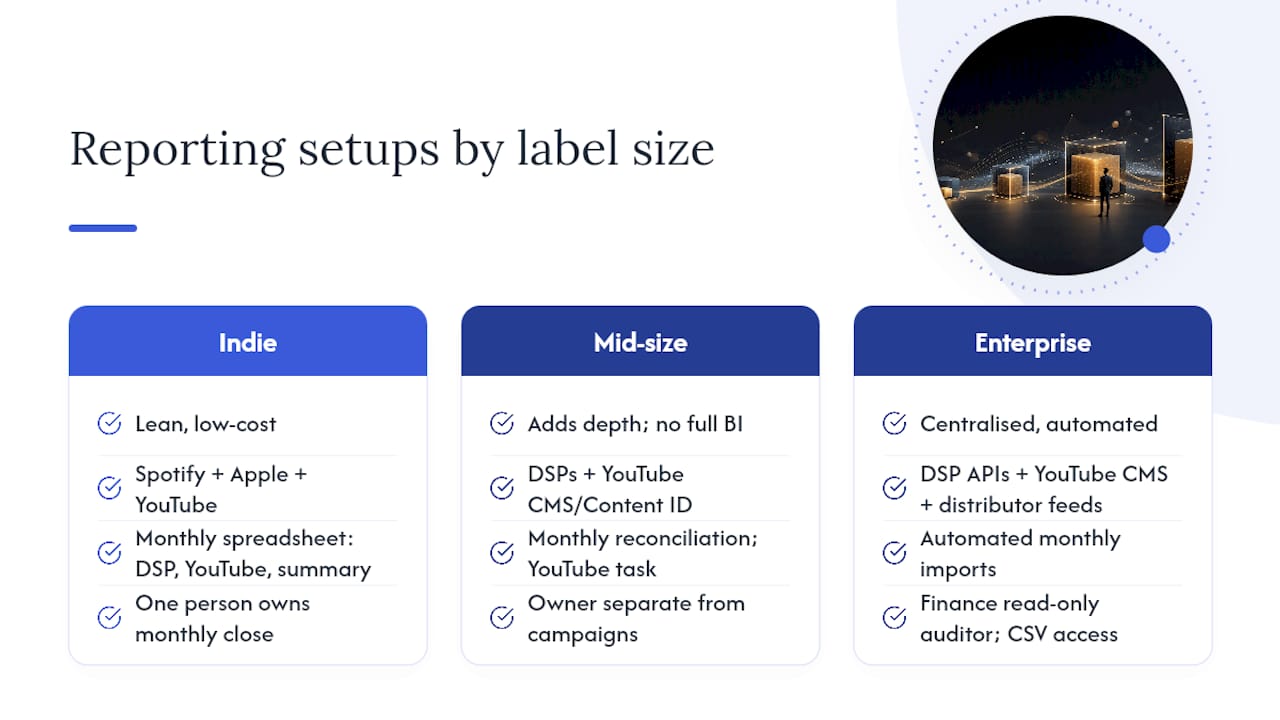
Indie setup — lean and low-cost. Run Spotify for Artists and Apple Music for Artists natively. Use YouTube Analytics for channel performance. Reconcile monthly in a spreadsheet: one tab per DSP statement, one tab for YouTube CMS exports, one summary tab. Assign one person to own the monthly close. Tools like DistroKid or TuneCore provide basic payout dashboards that cover mechanicals for most indie releases.
Mid-size setup — add depth without full BI overhead. Bring in YouTube CMS/Content ID as a dedicated monthly task. Add a campaign dashboard (Google Ads and paid social in one view) for any release with a paid campaign. Use a distributor with a structured statement view — AWAL, for example, provides territory and track-level reporting that bridges the gap between indie tools and enterprise platforms. Designate a monthly reconciliation owner who is not the same person running campaigns; the separation catches errors faster. EXEQ offers a roster OS that consolidates revenue tracking, splits, and deal context into a live per-artist view, which suits managers handling multiple artists at this tier.
Enterprise setup — centralise everything. Connect DSP APIs, YouTube CMS exports, and distributor statement feeds into a data warehouse (BigQuery is common). Build visualisations in Looker Studio or a comparable BI tool. Automate monthly statement imports. Give finance a read-only auditor seat with CSV export access. Tools like Chartmetric and Songtrust add catalogue-level rights data and publishing royalty tracking on top of the streaming layer. Intelligence platforms such as Music Intel Pro surface fraud alerts and per-artist health dashboards that are worth forwarding directly to artists or agents without rework.
How to centralise data: three integration patterns
Three patterns cover most label setups. Which one fits depends on budget, technical resource, and how many revenue streams you are reconciling.
- Aggregator as middle layer — use a platform like Chartmetric or Soundcharts to pull DSP, social, and playlist data into one dashboard. Faster to deploy, lower cost, but aggregators rarely include full CMS/Content ID transaction data or auditor-grade exports.
| Integration pattern | Data sources covered | Revenue types | Granularity | Update frequency | Export/audit capability |
|---|---|---|---|---|---|
| Direct API to BI | DSPs, YouTube, distributors, ad platforms | All | ISRC/UPC, territory, claim | Daily to real-time | Full CSV, API, auditor-ready |
| Aggregator platform | DSPs, social, playlists, some airplay | Streaming, some ad | Track, territory | Daily | Limited; varies by vendor |
| Spreadsheet/CSV bridge | Any platform with export | All (manual) | ISRC/UPC if exported correctly | Monthly | Full, if exports are complete |
The implementation sequence is the same regardless of pattern: connect the data source, normalise identifiers (ISRC, UPC), store a canonical record, then build visualisations or reports on top. Skipping the normalisation step is what causes most reconciliation failures.
Reporting cadence and what UK labels need to keep for audits
Treat cadence as three tiers:
- Real-time/daily: DSP performance (streams, saves, playlist adds), YouTube Analytics (views, watch time), campaign spend and cost per result. Use these for operational decisions.
- Monthly: YouTube CMS usage reports, distributor payout statements, PRS and PPL statements. Use these for revenue reconciliation and cash-flow tracking.
- Quarterly/annual: full audit exports, tax-ready summaries, ISRC-level transaction logs. Use these for royalty audits, label accounting, and any collection society queries.
Export checklist for reconciliation:
- ISRC and UPC for every track and release
- Play/stream counts at track and territory level
- Revenue per transaction (not just totals)
- Payment date and currency
- Fee and commission breakdowns
- Claim IDs for YouTube CMS transactions
PRS for Music and PPL both require labels to retain supporting metadata and raw statements to substantiate royalty claims during audits. Missing identifiers, particularly ISRCs, are the primary cause of unmatched transactions and uncollected income. A canonical metadata template covering release title, ISRC, UPC, main artist IPI, and work ISWC helps prevent matching errors across DSPs, YouTube, and distributor statements.
Key takeaways
The most reliable label reporting stack pairs ISRC-level DSP data with monthly YouTube CMS exports and a single reconciliation owner who closes the books each month.
| Point | Details |
|---|---|
| Start with DSP and royalty views | Cover streaming royalties and distributor payouts before adding any other dashboard type. |
| YouTube CMS is a separate revenue stream | Content ID ad revenue, Shorts pool, and Premium splits require a dedicated monthly CMS export, not just YouTube Analytics. |
| ISRC is the reconciliation key | Missing or inconsistent ISRCs cause most unmatched transactions across DSPs, YouTube, and distributor statements. |
| Match cadence to decision type | Use daily data for operational calls; use monthly statements for revenue reconciliation and audit preparation. |
| Musicvideomarketplace supports the video layer | Ready-to-edit videos and YouTube-ready exports from Musicvideomarketplace give labels campaign-ready assets that feed directly into YouTube Analytics and campaign ad dashboards. |
The dashboard gap most labels ignore
Labels spend considerable effort building streaming dashboards and almost none building the governance layer that makes those dashboards trustworthy. A beautifully designed Looker Studio view fed by inconsistent ISRCs is not a reporting asset; it is a liability dressed up as one.
The reconciliation mismatches that surface most often are not caused by platform errors. They come from a label releasing a track under one ISRC on Spotify, a slightly different metadata record on YouTube CMS, and a third variant in the distributor’s system. The numbers never align because the identifiers never matched to begin with. One canonical metadata template, applied at the point of release rather than retrospectively, fixes this before it becomes an audit problem.
Dashboards are decision tools. The question worth asking about any dashboard is not “does it look good in a board presentation?” but “can I use this to find money we are not collecting?” If the answer is no, the dashboard is decoration.
Useful sources and documentation
- How to monetise your music on YouTube in Asia: a complete CMS guide for 2025
- What Labels and Managers Use to Track Campaigns | Orphiq
- Music Intel Pro — Music intelligence platform
- Soundcharts: Music analytics tool
- EXEQ — Roster OS for artist managers
Recommended
- Label digital asset organisation checklist for UK labels | Music Video Marketplace Blog
- Why labels invest in video content: a label marketer’s guide | Music Video Marketplace Blog
- Live streaming for musicians: earn, engage and repurpose | Music Video Marketplace Blog
- YouTube y el descubrimiento de productores: guía 2026 | Music Video Marketplace Blog
Read next
 What is audio branding: a guide for marketersDiscover what is audio branding and how it shapes brand identity. Learn to leverage sound to enhance recognition and emotional connection.
 What is long form music content: a 2026 guideDiscover what long form music content is and how it engages audiences. Learn its benefits for artists in our 2026 guide!
 Why labels invest in video content: a label marketer's guideDiscover why labels invest in video content to boost revenue, enhance audience engagement, and maximize marketing efforts for lasting results.
 Label fan engagement programmes: the complete guideDiscover the essential types of label fan engagement programs that boost audience loyalty and drive sales in the music industry.
Turn the idea into a finished music video.
Drop your track into the Studio and build your visual in minutes.