
The role of end screens on YouTube for musicians
Discover the critical role of end screens on YouTube for musicians. Turn engaged viewers into subscribers and boost your video’s impact!

The role of end screens on YouTube for musicians
TL;DR:
- End screens convert engaged viewers into subscribers, boost watch time, and improve organic reach when properly implemented. Musicians should create a clean, 15–20 second outro with a verbal call-to-action and relevant video or playlist links, tested on mobile devices before publishing. Pairing visual elements with spoken prompts significantly increases click-through rates and channel growth.
End screens convert warm viewers into subscribers, repeat plays, and commercial clicks — but only when you pair a relevant video or playlist with a verbal call-to-action in a clean 15–20 second outro. If you take one thing from this guide, make it this: reserve that final stretch in your edit before you upload, not after.
Quick actions to take right now:
- Set aside the final 15–20 seconds of your music video as a designed outro, free of conflicting motion or branding.
- Script a verbal CTA into the outro: “Watch this next” or “Subscribe for the new single” said aloud lifts clicks far beyond a silent button.
- Enable “Best for viewer” or choose a context-relevant follow-up video or playlist in YouTube Studio.
- Test the published video on an Android or iOS device before announcing the release.
End screens are the last conversion moment in a music video. Viewers who reach the final 20 seconds are already engaged — treat that moment the way a label treats the final push before chart week, not as a polite goodbye.
Musicvideomarketplace builds ready-made music videos with end-screen-friendly outro templates, so your video arrives structured for this exact moment.
Table of Contents
- Why end screens are a conversion and algorithm tool for music promotion
- What end-screen elements exist and how should musicians use them?
- Music-specific best practices: timing, layout, CTAs, and mobile
- How to add an end screen in YouTube Studio for a music video
- How to measure end-screen performance and run quick experiments
- Common mistakes musicians make with end screens
- Key takeaways
- Why end-screen-ready videos matter more than most musicians realise
- Ready-made music videos that arrive end-screen-ready
- Useful sources and further reading
Why end screens are a conversion and algorithm tool for music promotion
End screens matter because they convert engaged viewers into continued watch time and subscribers — the two metrics YouTube’s algorithm rewards most directly. When a viewer clicks through to a second video, they extend the session. Longer sessions signal to YouTube that your channel holds attention, which feeds the recommendation engine and increases the chance your next single surfaces organically.
Alan Spicer frames this precisely: viewers who reach the end of a video are warm leads, not casual browsers. The end-screen moment should be treated like a final conversion push, not a formality.
For musicians, this maps directly to commercial goals. A viewer who watches your new single and then clicks through to a playlist of your back catalogue is worth far more than one who exits. If your channel is enrolled in the YouTube Partner Programme, that session continuation also opens the door to merch and ticket link eligibility. The importance of end screens is not abstract — it shows up in watch-time reports and subscriber graphs within days of optimising.
What end-screen elements exist and how should musicians use them?
YouTube Help confirms you can add up to four elements in the last 5–20 seconds of any video that is at least 25 seconds long. Non-16:9 aspect ratios may support fewer elements.
| Element | Specs and constraints | Best use for musicians |
|---|---|---|
| Video or playlist | Up to 4 elements; video must be ≥25s | Promote next single, create binge sessions with a release playlist |
| Best for viewer | YouTube selects the most relevant video | Use when your catalogue is large or the campaign is ongoing |
| Subscribe | One per end screen | Always include — captures fans for future releases |
| Channel | Promote a secondary channel | Useful for artists with a vlog or behind-the-scenes channel |
| External link | YouTube Partner Programme only | Merch store, ticket link, or official site |
End screens do not appear in YouTube Music, YouTube Kids, most mobile web browsers, Shorts, or 360 videos, and viewers can hide them manually. That is why backup CTAs in the video description and a pinned comment are non-negotiable, not optional extras.
Playlists drive binge-watching and longer sessions more reliably than single-video links, because they trigger autoplay and keep the viewer inside your channel. For a new single release, link to a “Latest Releases” playlist rather than one standalone track.
“Best for viewer” vs a specific video: if your catalogue has fewer than ten videos, choose a specific follow-up manually. Once you have a deeper library, “Best for viewer” typically outperforms static links because YouTube personalises the recommendation to each viewer’s history.
Pro Tip: For commercial campaigns, pair an external merch or ticket link with a video element so you capture immediate buyers and viewers who need another watch before they convert.
Music-specific best practices: timing, layout, CTAs, and mobile
Reserve 15–20 seconds as a designed outro template, not an afterthought. Build it into the edit project from the start, with placeholder areas for end-screen elements and no competing motion or branding in that zone.
Pacing matters more than most musicians expect. Abrupt endings can reduce clicks by as much as 40% because viewers leave before the interactive elements become clickable. A slow fade or a held instrumental note keeps them present long enough to act.
For layout, the power pair is one video or playlist element plus the subscribe button. Place the video thumbnail on the left or centre and the subscribe button in the lower right, away from any channel logo or watermark. Keep the visual field clean so the elements read clearly on a 5-inch phone screen.
Verbal CTAs are where most musicians leave clicks on the table. Pairing a visual end screen with a spoken call-to-action materially increases conversion versus visual-only prompts. Daniel Whitmore’s analysis of end-screen audits consistently shows that saying “click this video next” or “hit subscribe for the new single” during the outro lifts results significantly compared to letting the buttons sit in silence.
Say it aloud. A viewer watching on a phone with the screen dimmed may never see your subscribe button — but they will hear you ask.
20-second end screens tend to outperform shorter durations in click-through rates. Set your end screen to the full 20 seconds wherever retention data supports it.
For outro audio, consider how the mix translates across listening contexts. A well-designed ambient sound design approach to the outro keeps the mood without overwhelming the verbal CTA.
Pro Tip: In your editing project, build a reusable outro template — 20 seconds, clean background, placeholder zones for end-screen elements. Use YouTube Studio’s “Import from video” feature to apply the same end-screen layout across every upload without rebuilding it each time.
How to add an end screen in YouTube Studio for a music video
A well-configured end screen takes under ten minutes from YouTube Studio once your video is uploaded.
- Open YouTube Studio and select the video.
- Click Editor in the left menu, then select End screen.
- Choose “Best for viewer” or select a specific video or playlist from your channel.
- Add the Subscribe element.
- Position elements so they do not overlap key visual branding in the outro frame.
- Set the timing: start the end screen at least 20 seconds before the video ends where possible.
- Click Save, then Preview the video in the Studio player.
- Use “Import from video” to copy a successful layout to future uploads.
Before announcing the release, check these:
- Watch the end screen on an Android or iOS app — this is where most of your audience will see it.
- Open the video on desktop to confirm thumbnail clarity and element positioning.
- Note that mobile web browsers and YouTube Music will not show end screens; confirm your description and pinned comment carry the same CTA.
How to measure end-screen performance and run quick experiments
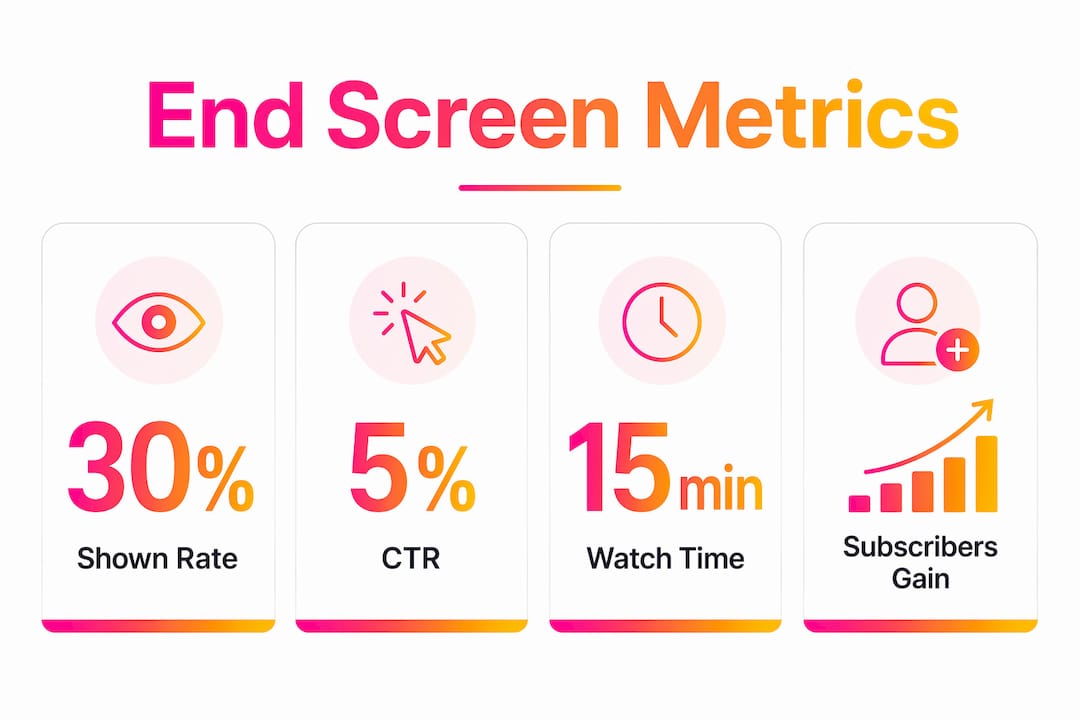
Track three numbers: shown rate (how many viewers reach the end-screen period), element click-through rate, and watch time generated from end-screen referrals. Find all three in YouTube Studio under Analytics → Engagement → End screens.
CTR benchmarks from ThumbMentor give a useful frame: neglected channels typically see 1–2% CTR; well-optimised channels reach 8–15%; strong series content can push beyond 15%. If you are below 1%, the end screen itself is not the first problem to fix.
| Metric | What it tells you | Action threshold |
|---|---|---|
| Shown rate | % of viewers who reach the end screen | Below ~30%: focus on retention in the main content first |
| Element CTR | Clicks per element ÷ impressions | Under 1%: change element or verbal CTA; 3%+ is solid |
| Watch time from referrals | Minutes generated by end-screen clicks | Rising = end screen is feeding session time |
Experiment ideas: swap “Best for viewer” for a specific video, change end-screen duration from 10 to 20 seconds, update the promoted video’s thumbnail, or add a playlist instead of a single track. Run each change for two weeks and change only one variable at a time.
Pro Tip: Fix the shown rate before you optimise CTR. If fewer than 30% of viewers reach your end screen, a better thumbnail on the promoted video will not move the needle — improve retention in the main content first.
Common mistakes musicians make with end screens
Most end-screen problems come down to five repeatable errors.
- Ending abruptly. The video cuts to black before the end screen loads. Fix: build a 15–20 second outro with held audio or a slow fade.
- Crowding four elements. Four elements compete for attention and reduce clicks on each. Fix: use the power pair — one video or playlist plus subscribe.
- Linking an irrelevant video. A viewer who just watched a melancholic ballad does not want to be sent to an upbeat DJ set. Fix: choose “Best for viewer” or a thematically matched follow-up.
- No verbal CTA. The buttons sit in silence. Fix: script “watch this next” or “subscribe for the release” into the outro before you record.
- Skipping the mobile test. End screens look fine on desktop and broken on a phone. Fix: always test on the YouTube app before the public announcement.
- Ignoring backup CTAs. End screens do not show in YouTube Music or most mobile browsers. Fix: pin a comment with the follow-up video link and include it in the description.
For paid campaigns specifically: use playlists in awareness-phase campaigns to drive binge behaviour, and specific video links in conversion-oriented TrueView or Bumper follow-ups where a single focused action matters more.
Key takeaways
End screens are the single highest-leverage conversion tool at the end of a music video, and the power pair of one relevant video plus a subscribe button, backed by a spoken CTA, consistently outperforms every other configuration.
| Point | Details |
|---|---|
| Reserve 15–20s outro | Build a clean, motion-free outro zone in the edit before uploading — not after. |
| Use the power pair | One video or playlist element plus subscribe outperforms crowded four-element layouts. |
| Add a verbal CTA | Say “watch this next” or “subscribe” aloud in the outro — silent buttons underperform. |
| Test on mobile | End screens do not show in YouTube Music or most mobile browsers; always check the app. |
| Musicvideomarketplace | Ready-made music videos from Musicvideomarketplace arrive with end-screen-friendly outro templates built in. |
Run one experiment before your next commercial launch: swap “Best for viewer” for a specific playlist and measure CTR over two weeks.
Why end-screen-ready videos matter more than most musicians realise
The conventional advice is to add end screens after the video is finished. That is exactly backwards. An outro designed as an afterthought usually has competing motion, a logo that clashes with the subscribe button, and no space for a clean verbal CTA. The result is a technically valid end screen that nobody clicks.
The musicians who see real session-continuation gains treat the final 20 seconds as a designed conversion moment from the first frame of the edit. That means a held note, a slow visual fade, and a clear verbal ask — all planned before the video goes anywhere near YouTube Studio. The content strategy that supports this approach is not complicated; it just requires deciding what the viewer should do next before you decide how the video ends.
Ready-made music videos that arrive end-screen-ready
Musicvideomarketplace gives musicians a faster route to a YouTube-ready release. Every video in the marketplace is built with a clean 15–20 second outro zone, so you are not retrofitting end-screen space into a finished edit.

Upload your audio, apply your branding, and export a file that is already structured for the power pair. The platform also generates short social clips and supports ad campaign setup, so the same asset that carries your end screen on YouTube can run as a TrueView pre-roll the same day. There is no agency retainer and no long production queue — you pick a template, customise it, and launch.
Browse the music video templates at Musicvideomarketplace and start your next release with an outro that is built to convert from the first upload.
Useful sources and further reading
Start with the official YouTube documentation — it is the only source that reflects current platform behaviour and eligibility rules.
- YouTube Help: Add end screens to videos — the definitive reference for element types, timing rules, minimum video length, and platform exceptions (YouTube Music, Shorts, mobile web).
- Alan Spicer: YouTube end screen strategy — practical channel-growth analysis with session watch-time data and the 20-second recommendation.
- ytshark: YouTube end screens guide — covers “Best for viewer” vs specific video, verbal CTA evidence, and editorial workflow tips including the import-from-video feature.
- ThumbMentor: YouTube end screen strategy — CTR benchmarks and playlist binge-behaviour data.
- FameLifter: End screens glossary — concise reference on abrupt-ending impact and outro pacing.
- Musicvideomarketplace — browse ready-made music video templates built for UK and international releases, with end-screen-ready outro zones included.
UK musicians should note that YouTube Partner Programme eligibility (required for external merch and ticket links) is governed by YouTube’s standard terms applicable in the United Kingdom. Confirm current thresholds and eligible link categories directly with YouTube before including external links in an end screen.
Recommended
- Why build a YouTube presence? Unlock growth as a musician | Music Video Marketplace Blog
- Visibilité musicale : le rôle clé de la vidéo sur YouTube | Music Video Marketplace Blog
- Key advantages of YouTube for musicians in 2026 | Music Video Marketplace Blog
- Rôle du marketing YouTube pour les musiciens en 2026 | Music Video Marketplace Blog
Read next
 Role of subtitles in music videos: 2026 guideDiscover the role of subtitles in music videos. Enhance engagement and viewership to make your content stand out in 2026.
 The role of YouTube cards: a 2026 strategy guideDiscover the role of YouTube cards in boosting viewer engagement. Learn how to use this powerful tool effectively for your strategy.
 Role of YouTube in Music: Powering Indie Artist SuccessRole of YouTube in music—explore music discovery, channel features, long-form video, campaign strategies, and risks for independent artists worldwide.
 How to promote songs on YouTube with long videos and adsLearn how independent musicians promote songs on YouTube using engaging long-form videos and targeted ad campaigns to grow subscribers 50% faster in 2026.
Turn the idea into a finished music video.
Drop your track into the Studio and build your visual in minutes.