
What is video optimisation: a creator's guide
Discover what is video optimization and learn key techniques to boost playback quality and discoverability for your videos.

What is video optimisation: a creator’s guide
TL;DR:
- Video optimisation involves preparing videos for smooth playback and effective discovery on platforms like YouTube. It requires attention to technical settings, such as codec choice, and metadata elements like titles, descriptions, and captions to maximize visibility. Consistently integrating optimisation into your production workflow significantly improves audience engagement and search rankings.
Most musicians and content creators assume video optimisation means making files smaller. That misunderstanding costs views. Video optimisation is actually a two-part discipline: preparing your video for smooth playback across devices and preparing it for discovery by platform algorithms. Both halves matter. Skip the technical side and your video buffers and loses viewers in seconds. Skip the metadata side and the algorithm never surfaces it to the right audience. This guide covers both, with practical techniques you can apply before your next upload.
Table of Contents
- Key takeaways
- What is video optimisation and why it matters
- Technical settings that affect playback performance
- Optimising metadata for YouTube discoverability
- Building a repeatable optimisation workflow
- Common mistakes and how to avoid them
- My perspective on what actually moves the needle
- How Musicvideomarketplace helps you optimise and distribute
- FAQ
Key takeaways
| Point | Details |
|---|---|
| Optimisation is dual-purpose | Technical playback quality and metadata-driven discoverability are equally important for video success. |
| Codec choice affects quality and size | H.265 compresses roughly 50% better than H.264, reducing file size without sacrificing visual quality. |
| Algorithms read text, not video | Titles, descriptions, tags, and transcripts are the signals YouTube uses to categorise and rank your content. |
| Captions serve two masters | Accurate closed captions improve both accessibility and keyword relevance for search engines. |
| Workflows prevent missed steps | A repeatable checklist covering export settings, metadata, and thumbnails stops costly publishing errors. |
What is video optimisation and why it matters
Video optimisation is the process of fine-tuning videos so they load quickly, play smoothly, and get found by the right people on the right platforms. It covers everything from export settings and codec choices to the words you put in your title and description field. Many creators treat it as an afterthought, something to deal with after the creative work is done. That is exactly the wrong order.
The importance of video optimisation is often misunderstood because people reduce it to compression alone. In reality, metadata presentation strongly influences how platforms distribute and surface your content. You can have a technically pristine video file and still get zero views if the algorithm has no text signals to work with.
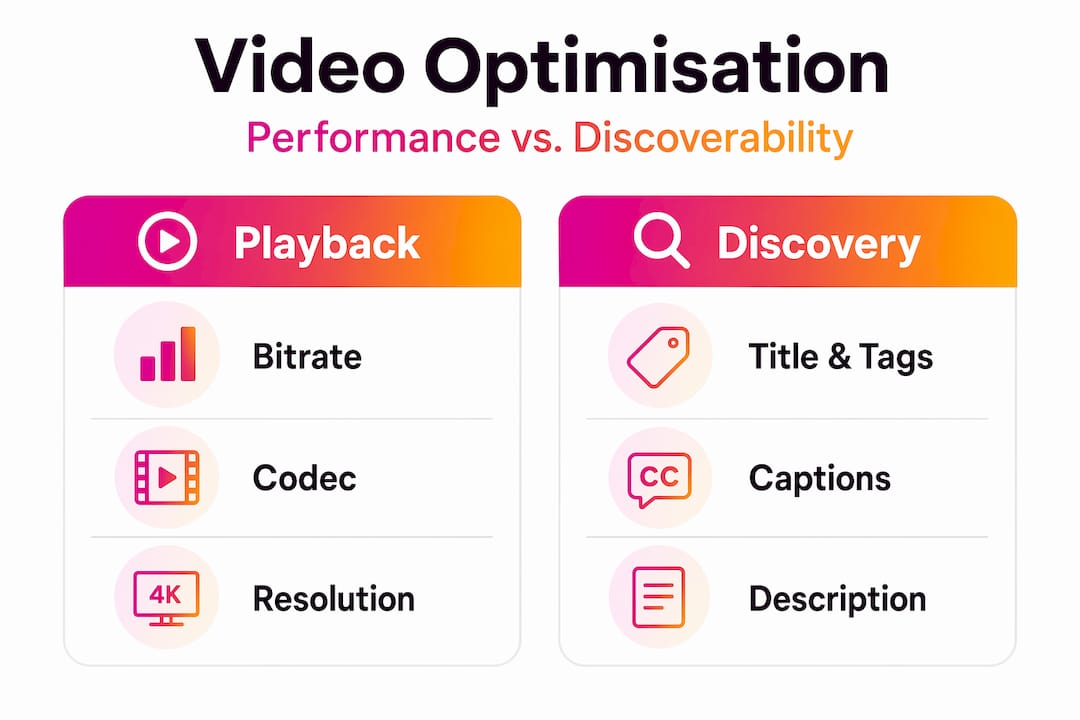
Think of it this way. Your video serves two very different audiences: the person watching it, who wants uninterrupted, sharp playback, and the algorithm, which cannot watch anything and relies entirely on crawlable text to decide what your video is about. Satisfying both audiences is precisely what video optimisation requires.
For musicians uploading to YouTube, this is not abstract. A music video with no description, auto-generated captions, and a vague title is invisible to search. The same video with a keyword-researched title, structured chapters, and an accurate transcript starts accumulating organic views from day one.
Technical settings that affect playback performance
Getting the technical side right begins at export. Your final export settings, including bitrate, codec choice, and container format, directly influence how your video performs after upload, affecting both visual quality and buffering behaviour.
Codecs and formats compared
The codec you choose is one of the most consequential technical decisions. H.265 compresses roughly 50% better than H.264 at the same visual quality, which means smaller files, faster uploads, and less re-encoding degradation on platforms like YouTube. The trade-off is that H.265 requires more processing power to encode, so older editing machines may struggle.
| Codec | File size | Compatibility | Best use case |
|---|---|---|---|
| H.264 | Larger | Universal | Fast exports, older hardware |
| H.265 | Smaller (~50%) | Modern platforms | High-quality uploads, bandwidth saving |
| MP4 container | Moderate | Widely supported | YouTube, web delivery |
For most creators uploading music videos to YouTube, H.264 in an MP4 container remains the safest default for compatibility. H.265 is worth considering as your primary editing codec if your machine and platform support it, because the quality-to-file-size ratio is superior at high resolutions.
Adaptive streaming and hosting choices
YouTube re-encodes every video you upload to deliver smooth streaming across different devices and internet speeds. That process can introduce artefacts in high-motion footage if your source file is not prepared correctly. Optimal source settings preserve quality through that re-encoding pipeline, which is particularly important for performance footage or music videos with fast cuts and vivid colour.

Self-hosting videos is rarely advisable. Dedicated hosting platforms use content delivery networks to deliver adaptive bitrate streams, while self-hosting often results in buffering and quality degradation under traffic load. For YouTube-focused creators, this is a non-issue since YouTube handles delivery. For anyone embedding videos on their own site, a dedicated host is worth the investment.
Pro Tip: Export at the highest practical bitrate for your source footage before uploading to YouTube. The platform will compress the file anyway, but starting from a higher-quality source reduces the artefacts YouTube’s encoder introduces.
Optimising metadata for YouTube discoverability
Here is where many creators leave the most views on the table. Video SEO techniques rely heavily on metadata because algorithms cannot watch your video. They read it. Titles, descriptions, tags, chapters, and transcripts are the primary signals YouTube uses to understand your content, categorise it, and decide who to show it to.
The practical implications of this for your music video are significant:
- Title: Include the song name, artist name, and a relevant descriptive phrase. “Artist Name: Song Title (Official Music Video 2026)” gives the algorithm multiple signals to work with.
- Description: Write at least 200 words. Include the song title, genre, lyric themes, and any relevant keywords in the first two sentences. The algorithm weighs early description text more heavily.
- Tags: Use a mix of broad genre tags (“indie rock”, “UK music”) and specific tags (song name, artist name, collaborators). Tags are less influential than they once were, but they still contribute to contextual signals.
- Chapters: Keyword-rich chapter titles that start at 0:00 and are listed in ascending order enable the “Key Moments” feature in search results, which significantly increases your video’s click-through rate.
- Captions and transcripts: Caption accuracy not only improves accessibility but also enhances keyword relevance for search engines. Auto-generated captions are often inaccurate enough to hurt rather than help.
Pro Tip: Use a video SEO guide to understand how captions and transcripts function as crawlable text, then write or correct them manually for your most important uploads.
Engagement metrics such as watch time, likes, comments, and shares also influence ranking significantly. That means metadata optimisation and content quality are linked. Good metadata attracts the right viewers; good content keeps them watching, which signals relevance to the algorithm and compounds your visibility over time.
Consistent, accurate closed captions connect accessibility and SEO in a way that benefits everyone. Viewers who watch without sound stay engaged. Search engines find more keyword context. The effort to write accurate captions pays dividends across both dimensions.
Building a repeatable optimisation workflow
One of the most underrated video content optimisation tips is to treat optimisation as a production discipline, not a final checklist item you rush through before hitting publish. The creators who consistently perform well on YouTube are not necessarily those with the biggest budgets. They are the ones with the most disciplined processes.
Here is a practical pre-publish optimisation workflow:
- Export verification: Confirm codec, resolution, and bitrate match your platform’s recommended specs before uploading.
- Title draft: Write three title options using keyword research, then choose the one that balances search intent with genuine appeal.
- Description completion: Write a full description including song context, keywords, lyrics excerpt if relevant, and relevant links.
- Chapter timestamps: Add chapters at meaningful moments in the video, each with a keyword-relevant title.
- Caption review: Upload a corrected transcript rather than relying on auto-generated captions.
- Thumbnail creation: Design a custom thumbnail with consistent branding, strong contrast, and text if appropriate.
- Playback testing: Watch the uploaded video on at least two devices before publishing to catch encoding issues.
Structured optimisation workflows with checklists improve consistency and prevent missed steps. When you are uploading multiple music videos or managing content for several artists, this matters even more.
AI-powered tools can generate structured descriptions with keyword placements and formatted timestamps in seconds, which reduces the time cost of proper metadata significantly. Treat them as a starting point, not a final output. Review and personalise every generated description before it goes live.
Common mistakes and how to avoid them
Even experienced creators make optimisation errors that quietly limit their reach. Recognising these patterns early saves months of underperformance.
Ignoring platform specs: YouTube’s recommended upload settings are not suggestions. Uploading at incorrect resolutions or with incompatible codecs forces the platform to do more re-encoding work, which degrades quality.
Neglecting captions: Many music creators skip captions because they believe lyrics do not need transcription. The SEO value of accurate captions means this decision has a measurable cost in discoverability.
Poor thumbnail choices: Auto-generated thumbnails almost always underperform custom ones. Your thumbnail is the single most powerful variable in your click-through rate, and click-through rate is one of YouTube’s most important ranking signals.
Keyword stuffing in titles and descriptions: Packing titles with repetitive keywords reads as spam to both the algorithm and real viewers. Use keywords intentionally, not obsessively.
- Use analytics to identify where viewers stop watching. Significant drop-off points suggest either a metadata mismatch (your title promised something your content did not deliver) or a pacing problem worth addressing in future videos.
- Monitor your click-through rate per video. A rate below 2% on an established channel usually points to a thumbnail or title problem.
- Test two versions of a title or thumbnail using YouTube’s built-in A/B testing tools. Data beats intuition every time.
Pro Tip: For music video engagement, the first 30 seconds of watch time is the most critical period. If your video intro loses viewers consistently, no amount of metadata optimisation will compensate. Fix the content first, then refine the metadata.
My perspective on what actually moves the needle
I have worked with enough creators to notice a consistent pattern. The ones who treat video SEO as a separate discipline from video production, something you do after the creative is done, consistently underperform. The ones who build optimisation into the production process from the start, where metadata planning begins before filming, tend to outperform their technically superior competitors.
My honest view is that for musicians and music video creators specifically, the metadata gap is far larger than the technical quality gap. Most creators now shoot on decent cameras and edit competently. Very few write genuinely good descriptions, structure chapters thoughtfully, or invest time in accurate captions. That gap is where the real opportunity sits in 2026.
I have also found that YouTube music distribution workflows that treat metadata as a pipeline component rather than a box-ticking exercise produce dramatically more consistent results. When you have a repeatable process, you spend less cognitive energy on mechanics and more on the quality of the creative decision within each field.
The uncomfortable truth is that most video optimisation failures are not technical. They are behavioural. Creators who understand this shift from asking “how do I compress this file?” to “what does my viewer and the algorithm both need from this upload?” That shift in framing is worth more than any individual tool or technique.
— Music
How Musicvideomarketplace helps you optimise and distribute
If the optimisation workflow above sounds like a lot to manage alongside the creative work of making music, that is because it is, without the right support.

Musicvideomarketplace is built specifically for musicians who want to create professional long-form videos, upload them to YouTube, and run ad campaigns for their songs, all without needing a marketing team. The platform guides you through upload best practices, helps you structure metadata correctly, and connects your video directly to ad campaign tools. If you are an indie artist or working creator who wants to apply best practices for YouTube ads without spending weeks learning the mechanics, Musicvideomarketplace is worth exploring.
FAQ
What is video optimisation, exactly?
Video optimisation is the process of preparing a video file for smooth playback across devices and maximum discoverability on platforms like YouTube. It covers both technical settings such as codec and bitrate, and metadata elements including titles, descriptions, and captions.
Why does metadata matter more than compression?
Algorithms on platforms like YouTube cannot watch your video. They rely entirely on text signals from titles, descriptions, tags, and transcripts to categorise and rank content. Strong metadata directly determines how many people the algorithm shows your video to.
Which codec should I use for YouTube uploads?
H.264 in an MP4 container is the most compatible option and the safest default. H.265 offers roughly 50% better compression at equivalent quality, making it a strong choice for creators on modern hardware who want smaller file sizes without quality loss.
How do captions improve video SEO?
Accurate captions provide crawlable text that search engines use to assess keyword relevance. They also improve accessibility, keeping viewers who watch without sound engaged longer, which boosts watch time and signals relevance to the algorithm.
How often should I review my optimisation approach?
Check your analytics monthly, paying particular attention to click-through rate and audience retention per video. When you see consistent drop-off patterns or low click-through rates, treat it as a signal to test a new title, thumbnail, or content structure rather than leaving underperforming videos unchanged.
Recommended
- Optimisez vos vidéos musicales YouTube : guide 2026 | Music Video Marketplace Blog
- Was ist Videooptimierung auf YouTube? Der Guide für Musiker | Music Video Marketplace Blog
- Effective video content strategies for musicians: a guide | Music Video Marketplace Blog
- Boostez vos vidéos musicales : meilleures pratiques YouTube | Music Video Marketplace Blog
Read next
 What is YouTube monetisation for musicians: a guideLearn how YouTube monetisation works for musicians, including Partner Programme requirements, revenue streams, Content ID benefits, and practical strategies to maximise earnings from your music content.
 Why build a YouTube presence? Unlock growth as a musicianDiscover why build a YouTube presence is crucial for musicians. Unlock growth and connect with fans on the world's top music discovery platform.
 Why optimise for YouTube to boost your music careerDiscover why optimising for YouTube's algorithm and ads delivers better music promotion results than chasing subscribers. Learn cost-effective strategies to boost visibility.
 What is a YouTube channel trailer for musicians?Discover what a YouTube channel trailer is and how it can boost your subscriptions by 30-50%. Elevate your music career now!
Turn the idea into a finished music video.
Drop your track into the Studio and build your visual in minutes.