
What is a YouTube channel trailer for musicians?
Discover what a YouTube channel trailer is and how it can boost your subscriptions by 30-50%. Elevate your music career now!

What is a YouTube channel trailer for musicians?
A YouTube channel trailer is a short video that autoplays for non-subscribers when they land on your channel’s home tab. Think of it as a short pitch to a stranger who has never heard your music: it plays automatically, it speaks directly to them, and its only job is to turn that visit into a subscription. Subscribers never see it — YouTube shows them a different featured video instead. You set it up in YouTube Studio under Customisation → Layout, and any public or unlisted video on your channel can serve as the trailer.
For musicians, this is one of the most underused tools on the platform. A well-edited 60-second trailer with a strong hook can lift channel-page subscribe rate by 30–50% compared with having no trailer at all. That figure alone makes it worth treating seriously.
Pro Tip: Set your trailer before you run any YouTube ad campaign or playlist promotion. New visitors arriving from those sources land on your channel page first — if there is no trailer, you are wasting that traffic.
Table of Contents
- Where your trailer appears and why it matters for your channel
- How to add or change your trailer in YouTube Studio
- What to include in your trailer — structure and script guidance
- Technical specifications for musician trailers
- How to measure and refresh your trailer
- Ready-to-use trailer scripts and shot lists
- Musicvideomarketplace gives you a ready-made trailer asset fast
- Key takeaways
- The trailer is the most neglected minute in music marketing
- Useful sources and further reading
Where your trailer appears and why it matters for your channel
The trailer sits at the very top of your channel’s home tab, but only for visitors who have not yet subscribed. The moment someone subscribes, the trailer disappears for them permanently and is replaced by whichever video you have designated as the featured video for returning viewers. These are two separate slots in YouTube Studio, and confusing them is a common mistake.
For musicians, the channel page is a high-intent surface. Someone who has clicked through from a playlist, a search result, or a shared link has already shown interest. They are not passive scrollers — they are evaluating whether to follow you. That is exactly the moment a trailer can convert them. The benefits of YouTube promotion compound quickly when your channel page is set up to capture that intent.
One detail that catches artists off guard: trailers commonly autoplay muted on mobile, and mobile accounts for the majority of YouTube views. Your visual branding has to communicate genre, mood and identity before a single note plays. Bold typography, a recognisable colour palette, and high-contrast captions are not optional extras — they are the trailer working as intended for a significant portion of your audience.
There are also no default ads on a channel trailer, so it functions as an uninterrupted conversion asset, unless the video contains third-party claimed content. Keep your audio properly licensed and the trailer plays clean, start to finish.
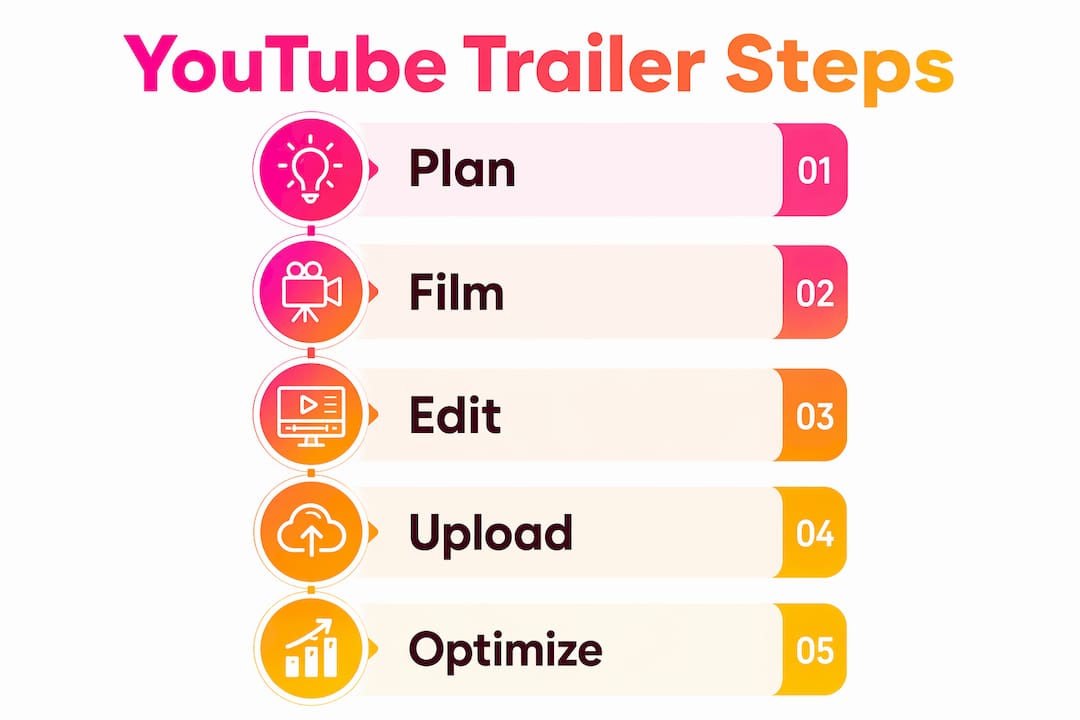
How to add or change your trailer in YouTube Studio
Sign in → YouTube Studio → Customisation → Layout → Channel trailer for people who haven’t subscribed → add or select your video → Publish. That is the full path. Here is what each step actually looks like:
- Sign in to YouTube Studio at studio.youtube.com and select your channel.
- Click Customisation in the left-hand menu, then select the Layout tab at the top.
- Find the “Channel trailer for people who haven’t subscribed” section — it is the first card on that tab.
- Click Add (or the pencil icon if a trailer already exists) and choose a video from your channel. Only public or unlisted videos are eligible.
- Preview the selection, check the thumbnail, and confirm the video starts at the right moment.
- Click Publish in the top-right corner. Changes go live immediately.
A few things to check before you publish: does the thumbnail communicate your genre at a glance? Is there a subscribe CTA visible within the first 15 seconds? Have you pinned a relevant playlist or single directly below the trailer on the Layout tab so new visitors have an obvious next step?
Pro Tip: After publishing, open your channel page on a mobile browser while logged out. This shows you exactly what a new visitor sees, including the muted autoplay behaviour. Most artists only ever check on desktop and miss the mobile experience entirely.
What to include in your trailer — structure and script guidance
The trailer should answer three questions in the first seconds: who you are, what kind of music you make, and why someone should subscribe now. YouTube’s own guidance frames it like an ad: entertain first, show what you make, then ask for the action.
The structure that works consistently for musicians follows this shape:
- Hook (0–10s): Your name or artist brand, one line about your sound, and a visually arresting clip. Do not open with a slow fade or a talking-head intro.
- Midsection (10–45s): Genre-defining performance clips, studio footage, or live moments. This is where the music does the work — even muted, the visual rhythm should feel right for your genre.
- CTA (final 10–15s): A direct subscribe ask, your release cadence (“new music every month”), and a visual end card.
For script lines, keep them short and specific. “I’m [Name] — I make [genre] music for people who [feeling/situation]” lands better than a vague “I make all kinds of music.” Captions are worth adding throughout, not just at the end, because a meaningful portion of your audience will watch without sound.
On licensing: use only audio you own or have properly cleared. In the UK, if you are using a sample or a co-written track, confirm clearance before the trailer goes live. A Content ID claim on your trailer does not block it, but it can trigger mid-roll ads on a video that is supposed to be an uninterrupted pitch.
Technical specifications for musician trailers
YouTube accepts a wide range of formats, but these settings give you the best result for a channel trailer specifically:
| Specification | Recommended setting |
|---|---|
| Frame rate | 30 fps (match your source footage) |
| File format | MP4 |
| Audio | AAC-LC stereo |
| Loudness target | –14 LUFS integrated (YouTube normalises on playback) |
| Thumbnail size | JPG or PNG, under 2 MB |
A purpose-made thumbnail matters even though the trailer autoplays. It appears in search results, suggested video panels, and anywhere the video is shared outside your channel page.
Pro Tip: Export a dedicated “trailer” preset in your editing software — DaVinci Resolve, Adobe Premiere Pro, or Final Cut Pro all support custom export presets. Saving one now means every future trailer refresh takes minutes, not an afternoon.
Audio note: YouTube normalises playback to roughly –14 LUFS, so mastering significantly louder than that will not give you a volume advantage — it will just be turned down. Mix for clarity, not loudness.
How to measure and refresh your trailer
Track three metrics in YouTube Analytics to judge whether your trailer is working: channel-page subscribe rate (the percentage of channel-page visitors who subscribe), view-through rate on the trailer itself, and new-visitor retention in the first 30 seconds. A drop-off before the 15-second mark usually means the hook is not landing.
Testing is straightforward. Swap the trailer after a major campaign or release, let it run for 2–4 weeks, then compare the channel-page subscribe rate before and after. Refreshing trailers regularly keeps first impressions aligned with your current sound and brand — a trailer that still references your 2023 EP when you have released two projects since then is actively working against you.
A sensible refresh cadence for most artists is to update with each major single or album release, or regularly every several months. When you refresh, run through this checklist:
- Update performance clips to reflect current sound and visual identity
- Revise the opening hook line if your artist positioning has shifted
- Check captions and on-screen text for accuracy
- Replace the thumbnail with one that matches current branding
- Update the description CTA and any linked playlists in the Layout tab
Ready-to-use trailer scripts and shot lists
These three templates are designed to be adapted in under an hour. Each follows the hook-midsection-CTA structure and fits within the 30–90 second recommended length.
Template 1 — Solo singer-songwriter (45 seconds)
- 0–8s: Close-up of hands on guitar or piano. On-screen text: “[Artist Name] — [Genre] songwriter.” Voice-over: “I write songs about [theme].”
- 8–35s: Three 8-second clips: live acoustic performance, studio session, lyric video excerpt. Captions highlight a key lyric.
- 35–45s: Direct to camera. “New music every [cadence]. Subscribe so you don’t miss it.” End card with subscribe button.
Template 2 — Electronic producer (30 seconds)
- 0–5s: DAW screen or hardware synth close-up. Beat drops immediately. Artist name in bold on-screen.
- 5–22s: Rapid-cut visuals synced to the track — studio, live set, visualiser. No voice-over needed; let the music carry it.
- 22–30s: Static logo frame. On-screen text: “Subscribe for new tracks every [cadence].”
Template 3 — Full band (60 seconds)
- 0–10s: Live performance wide shot cutting to individual close-ups. Voice-over: “We’re [Band Name] — [genre] from [city].”
- 10–45s: Mix of live footage, music video clips, and behind-the-scenes. Captions name the band and genre.
- 45–60s: Band member direct to camera. “Subscribe and come to the next show.” End card with tour dates link and subscribe button.
For shot lists, aim for clips of 5–8 seconds each in the midsection — shorter than you think you need. Anything longer starts to feel like a music video rather than a pitch.
Pro Tip: Export a 5–10 second version of your hook sequence for Instagram Reels or TikTok. Keep the full trailer exclusive to YouTube — the teaser drives traffic to the channel page, where the trailer does its conversion work. For cross-platform growth ideas, growing music without TikTok is worth reading alongside your trailer strategy.
Musicvideomarketplace gives you a ready-made trailer asset fast
The most common reason musicians skip the trailer is production time. Shooting, editing, and exporting a purpose-built 60-second asset takes longer than most artists have between releases.

Musicvideomarketplace solves that directly. The marketplace gives you access to human-made, ready-to-edit full-length music videos: upload your audio, apply your branding, and export a YouTube-ready file — including short social clips — without a production schedule. Every video comes with licence clarity built in, so there is no Content ID ambiguity when you set it as your trailer. You can also use the platform to launch an ad campaign for the same song, making the trailer the first touchpoint in a joined-up promotion strategy. Browse the Musicvideomarketplace catalogue, pick a video that fits your sound, and have a trailer-ready asset today.
Key takeaways
A YouTube channel trailer is the single highest-leverage page element on your channel — it autoplays for every new visitor and its only job is to convert them into a subscriber.
| Point | Details |
|---|---|
| Who sees the trailer | Only non-subscribers; subscribers see a separate featured video instead. |
| Ideal length | 30–90 seconds; hook early in the video to retain the visitor. |
| Mobile-first design | Trailers autoplay muted on mobile — captions and bold visuals are non-negotiable. |
| Measure and refresh | Track channel-page subscribe rate; update the trailer with each major release or every 6–12 months. |
| Musicvideomarketplace | Supplies ready-made, licensed music videos you can export as a trailer asset and launch as an ad campaign immediately. |
The trailer is the most neglected minute in music marketing
Most artists spend weeks on a music video and about ten minutes thinking about their channel trailer. That imbalance is hard to justify when the trailer is the one asset that plays automatically for every new visitor — the people most likely to subscribe if given a reason.
The conventional wisdom is that the trailer should “introduce” you. That framing undersells it. A trailer is a conversion tool. It should be built the way a direct-response ad is built: hook, proof, ask. The artists who treat it that way — with a proper hook in the first eight seconds, genre-specific visuals that work without sound, and a clear subscribe CTA — consistently see better channel-page performance than those who repurpose a long-form video and hope for the best.
The scripts and specs in this guide give you a working framework. The artist trailer examples on the Musicvideomarketplace blog show what that framework looks like in practice across different genres. Start there, build your trailer this week, and measure the channel-page subscribe rate over the following month. The data will tell you everything you need to know.
Useful sources and further reading
- YouTube Help — Customise your channel layout: official steps for setting a channel trailer in YouTube Studio, including which video types are eligible.
- YouTube Blog — Convert viewers into subscribers with your channel trailer: YouTube’s own creative guidance on trailer structure, CTA placement, and upload cadence.
- FameLifter — Channel trailer definition and why it matters: covers elevator-pitch structure, recommended length, and conversion uplift data.
- YTShark — How to make a YouTube channel trailer that converts: practical guidance on mobile autoplay behaviour, refresh cadence, and testing methodology.
- Musicvideomarketplace Blog — Examples of artist YouTube trailers: annotated real-world trailer examples across genres for musicians.
- Musicvideomarketplace Blog — Music branding through video: visual identity guidance covering colour palettes, logo usage, and brand consistency.
- Playlist Pilot — How to get on YouTube Music playlists: playlist placement strategy that pairs naturally with an effective trailer and release campaign.
Recommended
- Examples of artist YouTube trailers: 2026 guide | Music Video Marketplace Blog
- Complete Youtube Music Upload Workflow for Musicians | Music Video Marketplace Blog
- YouTube ad campaign examples for musicians: proven strategies | Music Video Marketplace Blog
- YouTube ad campaigns for indie musicians: a clear guide | Music Video Marketplace Blog
Read next
 What is video optimisation: a creator's guideDiscover what is video optimization and learn key techniques to boost playback quality and discoverability for your videos.
 What is YouTube monetisation for musicians: a guideLearn how YouTube monetisation works for musicians, including Partner Programme requirements, revenue streams, Content ID benefits, and practical strategies to maximise earnings from your music content.
 Why build a YouTube presence? Unlock growth as a musicianDiscover why build a YouTube presence is crucial for musicians. Unlock growth and connect with fans on the world's top music discovery platform.
 What is video SEO for musicians: boost your YouTube reachLearn how video SEO helps musicians optimise YouTube content for better discoverability. Master metadata, keywords, and engagement strategies to grow your audience.
Turn the idea into a finished music video.
Drop your track into the Studio and build your visual in minutes.