
YouTube ad specs 2026: the complete technical checklist
Maximize your video impact with essential YouTube ad specs for 2026. Understand resolution, format, and length to boost your campaign.
YouTube ad specs 2026: the complete technical checklist
BLUF: export 1080p masters at the correct aspect ratio (16:9, 9:16, or 1:1), upload them to YouTube as public or unlisted, keep the file under 256 GB, and match your length to the ad format: bumper ads run exactly 6 seconds, non-skippable in-stream caps out at 7 to 15 seconds, and Shorts stretch from 6 to 60 seconds. Skippable in-stream has no hard maximum, though anything past a few minutes tends to bleed budget without adding recall. These figures come straight from Google Ads Help, YouTube’s own Shorts spec, and production practice at Musicvideomarketplace, where we build masters for musicians daily.
Before you upload anything, run this quick pass:
- Confirm resolution is 1080p (720p is accepted, standard definition is not worth the risk).
- Check aspect ratio matches placement: 16:9 for in-stream, 9:16 for Shorts and vertical feeds, 1:1 for some in-feed placements.
- Export as MP4 with H.264 video codec video and AAC audio, keeping the file well under the 256 GB ceiling.
- Overlay a safe-zone template to confirm your logo and call-to-action sit clear of skip buttons and cards.
- If any part of the creative was AI-generated or AI-edited, apply the AI-labelling disclosure before you submit.
Pro Tip: A file that “technically works” isn’t the same as a file that performs. Google’s own re-encoding can chew through a bloated 4K export in ways a clean 1080p master avoids entirely.
Key Takeaways
Getting a YouTube ad approved on the first upload comes down to matching resolution, aspect ratio, file format, and length precisely to the format you’re running.
| Point | Details |
|---|---|
| Resolution and aspect ratio | Export 1080p at 16:9, 9:16, or 1:1 depending on placement; avoid SD entirely. |
| File format and size | Use MP4 with H.264 video codec and AAC, keeping well under the 256 GB limit for fastest processing. |
| Length by format | Bumper is fixed at 6 seconds, non-skippable runs 7 to 15 seconds, Shorts run 6 to 60 seconds. |
| Safe zones and AI labelling | Check overlays against official safe-zone templates and apply AI-labelling if the creative used AI edits. |
| Fast-track production | Musicvideomarketplace exports upload-ready 1080p masters plus vertical and Shorts cuts from your own audio and branding. |
Table of Contents
- YouTube ad specs at a glance
- What are the exact specs for each YouTube ad format?
- Thumbnail and companion banner specs you need to hit
- Which file formats and codecs does YouTube accept?
- How long should a YouTube video ad be?
- How do you avoid the most common YouTube ad rejections?
- What should musicians check before uploading a music video ad?
- What bitrate should you use for YouTube video ads?
- What frame rate should you use for a YouTube ad?
- What are YouTube’s audio specs for video ads?
- Does YouTube support HDR and what colour profile should you use?
- Do YouTube ads need captions and what languages are supported?
- Should you build vertical or horizontal masters first?
- How Musicvideomarketplace turns your song into an upload-ready ad master
- Frequently asked questions about YouTube ad specs
- Sources
YouTube ad specs at a glance
Every editor and marketer needs a reference they can check in under thirty seconds. Here’s the canonical version, pulled directly from official documentation rather than forum guesswork.
The gap between “recommended” and “accepted” matters more than most editors assume. YouTube will process a 720p file without complaint, but the platform’s compression pipeline is tuned around 1080p inputs, so anything below that resolution tends to show blocking artefacts once it’s re-encoded for delivery across devices. Standard definition survives the upload but rarely survives the viewer’s attention span.
Text-asset limits deserve equal attention. In-feed and Video action campaigns carry headline and description character limits that catch out creators who treat them as an afterthought, covered in more detail by Google Ads’ campaign-specific requirements. Get the video spec right and then trip over a truncated headline, and the campaign still under-performs.
What are the exact specs for each YouTube ad format?
Different formats behave like different products, not variations on a theme. A bumper is a different creative discipline to a skippable in-stream ad, and treating them the same is the fastest way to waste a production budget.
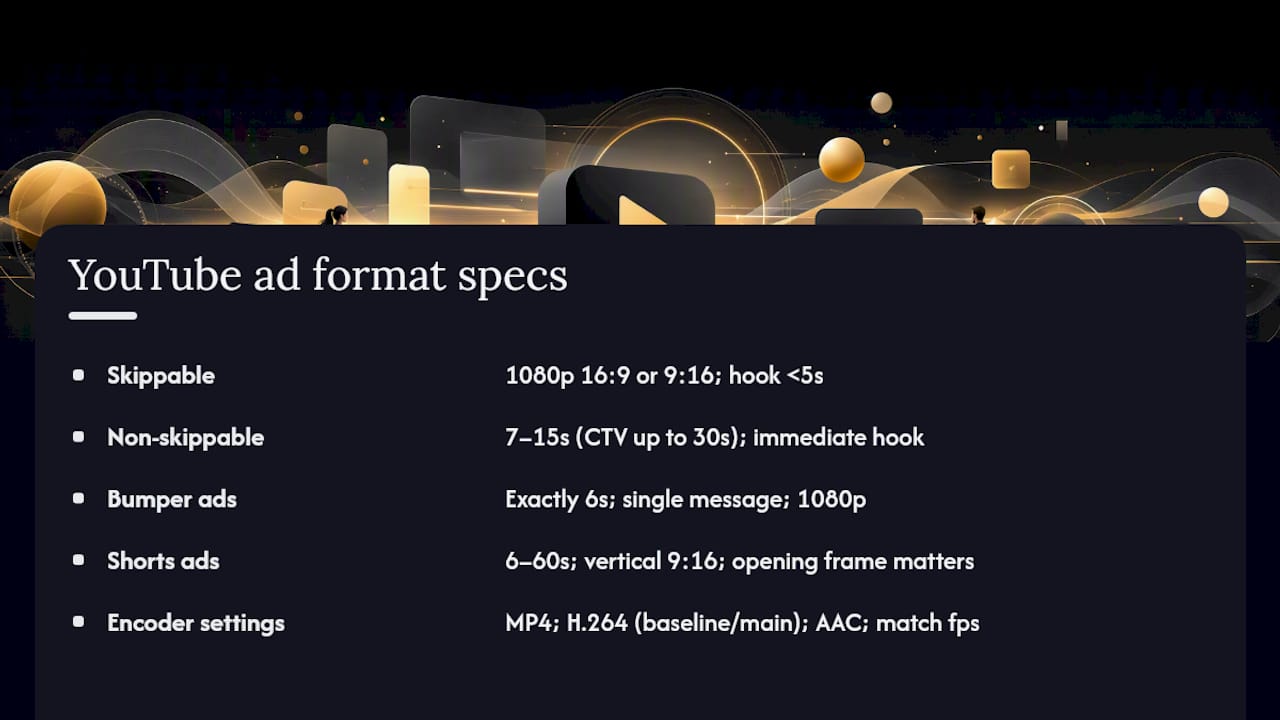
Skippable in-stream ads have the most flexibility and the least excuse for sloppiness. Export at 1080p, 16:9 for standard placements or 9:16 if you’re running vertical inventory, with no strict maximum length, though YouTube’s own format guidance and most media buyers agree that anything beyond three minutes needs a genuinely compelling reason to hold attention. Viewers can skip after five seconds, so your hook needs to land before then, not after your logo animation finishes.
Non-skippable in-stream ads are unforgiving on length: 7 to 15 seconds standard, with connected TV placements sometimes permitting up to 30 seconds. There’s no room for a slow build here. If your song’s chorus doesn’t hit until the second bar, this format punishes that structure. Cut to the hook immediately.
Bumper ads run exactly 6 seconds, full stop. This isn’t a soft guideline, it’s a hard technical cap enforced at upload. The discipline of a 6 second cut forces a single message, a single visual, and usually a single beat of music. Export these at the same 1080p standard as everything else, but plan the edit as its own creative exercise rather than a trimmed-down version of a longer cut.
YouTube Shorts ads run 6 to 60 seconds and must be delivered vertically at 9:16. This is the format most musicians get wrong by cropping a horizontal video down after the fact rather than shooting or editing vertical-first. Thumbnail behaviour differs here too: Shorts often pull a frame automatically rather than using your uploaded thumbnail, so the opening frame of your Short needs to work as a still image, not just as motion.
In-feed (Video action) and Masthead placements bring their own text constraints on top of the video spec. Headline and description lengths are capped, and in-feed video ad guidance sets out the exact character limits alongside notes on how thumbnails behave in feed placements versus in-stream. Masthead inventory is premium and reserved, so specs there are typically confirmed directly with your Google representative rather than self-served.
For encoder settings across all formats, the practical consensus looks like this: MP4 container, H.264 video codec video codec at baseline or main profile, AAC audio, frame rate matched to source (commonly 30fps), and bit-rate scaled to resolution rather than maxed out arbitrarily. A breakdown of which format suits which campaign goes further into matching creative structure to format choice for musicians specifically.
Thumbnail and companion banner specs you need to hit
Thumbnails and companion banners are the parts of a campaign editors forget until the night before launch, and they carry their own, separate pixel rules.
- Thumbnail: 1280×720px recommended, 1280×640px minimum, formats limited to .JPG, .GIF, or .PNG.
- Companion banner: exactly 300×60 pixels, capped at 150KB, and desktop-only, meaning it simply won’t display on mobile or CTV inventory.
- Keep thumbnail file sizes modest. A heavy, uncompressed PNG can slow load times without any visible quality gain over a well-optimised JPEG.
Test your thumbnail at actual display size before launch, not zoomed in on an editing timeline. A frame that reads clearly on a 27 inch monitor can turn into an illegible smear on a phone screen, and since companion banners only render on desktop, your mobile viewers will never see that asset at all, so don’t over-invest design time there relative to the thumbnail.
Which file formats and codecs does YouTube accept?
YouTube’s list of accepted containers is genuinely broad: .MPG, .MP4, .MOV, .WMV, WebM, ProRes, and HEVC all pass through the upload pipeline without rejection. That breadth is a trap as much as a convenience. The fact that a format is accepted doesn’t mean it’s the right choice.
- MP4 with H.264 video codec video and AAC audio processes fastest and causes the fewest downstream re-encoding issues.
- Maximum file size is 256 GB, but you will almost never need to approach that limit for a standard ad.
- Audio-only files are not accepted as ad assets, even for what is fundamentally a music promotion; the platform requires video.
- Codec and container mismatches (an HEVC stream wrapped in an unusual container, for instance) are a common, quiet cause of failed uploads.
Pro Tip: A 4K ProRes master might look stunning in your edit suite, but a 1080p H.264 video codec export at a sensible bit-rate will process faster and avoid the aggressive re-compression that oversized files often trigger on delivery. Bigger is not a synonym for better once the file leaves your hands.
How long should a YouTube video ad be?
The hard caps and the smart choices are two different conversations, and confusing them is where a lot of campaigns lose money on production they didn’t need.
- Hard caps first: bumper ads are locked at 6 seconds, non-skippable in-stream sits at 7 to 15 seconds (with some CTV allowances stretching to 30), Shorts run 6 to 60 seconds, and skippable in-stream has no enforced maximum.
- Awareness campaigns perform well around the 15 second mark, long enough for one clear message, short enough to survive a skip-happy audience.
- Consideration campaigns, where you’re building narrative or showcasing a fuller performance, can justify 2 to 3 minutes, provided the structure earns each additional second rather than just extending the same idea.
- Action campaigns (drive streams, drive ticket sales) tend to work best at 15 to 20 seconds or shorter, with the call-to-action stated plainly rather than implied.
- Watch the measurement thresholds too: YouTube counts a public view at 10 seconds or more, and a video needs to run 12 seconds or longer before it becomes genuinely useful for building remarketing lists. A 6 second bumper is a fine attention tool, but it won’t feed your retargeting audience the way a slightly longer cut will.
How do you avoid the most common YouTube ad rejections?
Skip buttons, channel branding, cards, and end screens all occupy fixed positions on the video frame, and YouTube’s interface sits on top of your creative whether you planned for it or not. Google publishes official safe-zone overlay templates specifically so editors can check their layout against these UI elements before export, and using one takes minutes.
- Keep logos, subtitles, and calls-to-action clear of the bottom-left skip button zone and the top-right channel icon area.
- Text overlays that cover too much of the frame, or that appear to mislead about content, are a frequent cause of disapproval.
- Copyright claims on music tracks stall review, so confirm licensing is clean before submission, not after rejection.
- Missing AI-labelling on AI-edited creative is a growing rejection cause following Google’s 2026 disclosure requirements.
- Uploading as private, rather than public or unlisted, is a simple but common error that blocks the ad outright.
- Mismatched aspect ratio for the placement (a square file pushed into a 16:9 in-stream slot) causes ugly letterboxing at best and rejection at worst.
Pro Tip: Run the safe-zone check before your final export, not after. Catching a misplaced logo in the edit suite costs you two minutes; catching it after a failed review costs you a full re-render and a delayed launch.
What should musicians check before uploading a music video ad?
Production for a music video ad isn’t quite the same discipline as a standard brand spot, and treating it identically wastes both time and impact. At Musicvideomarketplace, the workflow we recommend to artists and labels starts with the master, not the crop.
- Export your primary master at 1080p in the aspect ratio your main placement needs, then crop down to square or vertical rather than upscaling a square file up to fill a vertical frame.
- Burn in captions or lyric cards synced tightly to the audio. Most mobile viewers watch sound-off first, and a lyric card that lands a beat late reads as sloppy even when the visuals are strong.
- Preview every cut with the sound off before you sign off on the edit. If the story doesn’t hold up silently, it won’t hold up on a commuter’s phone either.
- Test your Shorts cut’s opening frame as a still image, since the platform can pull it as an automatic thumbnail regardless of what you uploaded separately.
Following the recommended crop-down workflow, rather than shooting separate masters for each placement, is one of the clearest ways artists have seen measurable reach gains, as detailed in Musicvideomarketplace’s case study on YouTube ad performance.
Musicians commissioning their first campaign often underestimate how much the length and structure choices above depend on the release goal, which our guide to musician-specific ad campaigns covers in more depth.
What bitrate should you use for YouTube video ads?
Bitrate is where a lot of otherwise well-shot ads quietly fall apart, because the right number depends on resolution, frame rate, and how much motion is actually in the frame. A static talking-head clip and a fast-cut concert edit at the same resolution need different bitrates to look equally clean after YouTube’s own compression pass.

As a working range, 1080p exports typically land somewhere between 8 and 12 Mbps for lower-motion content, climbing toward 35 Mbps for high-motion footage such as live performance cuts with rapid camera movement or dense visual effects. Content shot or mastered at 720p can drop that range roughly in half, since there’s less pixel information to preserve per frame. Going well beyond these figures rarely improves the viewer’s experience, because YouTube re-encodes every upload for its own delivery pipeline regardless of how much bitrate you feed in.
Frame rate interacts with bitrate directly. A 60fps export carries roughly double the motion information of a 30fps file at the same resolution, so it needs a proportionally higher bitrate to avoid smearing during fast movement, which matters for anything with quick cuts, strobing lights, or handheld camera work common in music video production.
The practical move is to encode at a variable bitrate with a sensible ceiling rather than a flat constant rate. This keeps file sizes reasonable during calmer scenes while reserving headroom for the busy ones, which matters more for a live-performance-heavy music video than for a simple studio shot with a locked camera.
What frame rate should you use for a YouTube ad?
YouTube accepts a fairly wide range of frame rates, but the practical decision is narrower than the technical limit suggests. The two industry standards that cover almost every use case are 30fps and 24fps, with 60fps reserved for specific creative reasons rather than default use.
30fps is the safe, default choice for most music video ad content. It matches typical broadcast and online video conventions, keeps file sizes and bitrate needs manageable, and looks natural across the motion speeds common in performance footage and narrative cutaways.
24fps carries a cinematic quality that suits narrative-driven music videos, particularly slower, more atmospheric pieces where the slight motion judder reads as intentional style rather than a technical limitation. It’s a deliberate creative choice more than a technical necessity.
60fps earns its place when a video contains genuinely fast motion, rapid camera pans, or content intended for later slow-motion use. It demands a meaningfully higher bitrate to avoid a muddy result, and doubles the raw footage a system needs to process, so it’s worth reserving for scenes that actually need it rather than applying it across an entire edit by default.
The critical rule sits above all of this: match your export frame rate to your source footage’s native frame rate wherever possible. Converting 24fps footage up to 30fps, or the reverse, through frame interpolation introduces artefacts, most visibly a subtle stutter during camera pans, that a keen-eyed viewer will notice even if they can’t name what’s wrong.
What are YouTube’s audio specs for video ads?
Audio quality gets less attention than resolution in most production conversations, which is ironic for a platform where a huge share of ad content is, functionally, a music promotion. AAC is the standard, widely supported audio codec for YouTube ad uploads, generally paired with an MP4 container for the smoothest processing.
Sample rate should sit at 48kHz, the broadcast and streaming standard, rather than the 44.1kHz rate common in music production for CD and digital music releases. If your final music mix was produced at 44.1kHz, resample it to 48kHz during export rather than leaving the mismatch for YouTube’s own pipeline to handle, since an unmanaged sample-rate conversion can introduce subtle audio artefacts.
Stereo audio at 128 to 192 kbps covers the vast majority of ad use cases well. Surround configurations exist but add complexity without meaningful benefit for a video ad viewed primarily through phone speakers, laptop speakers, or basic headphones, which describes most of the audience for this inventory.
One frequently overlooked point: audio levels matter as much as the format itself. A track mastered hot for streaming platforms can clip or distort after YouTube’s own loudness normalisation is applied. Checking your mix against a moderate loudness target before export avoids a mismatch between how the song sounds on release and how the ad version sounds once it’s live.
Does YouTube support HDR and what colour profile should you use?
Colour handling on YouTube ads sits in a middle ground between broadcast-grade precision and simple practicality, and most creators overthink it. Standard dynamic range in the sRGB or Rec. 709 colour space is the safe, default choice for the overwhelming majority of ad content, including nearly all music video production.
YouTube does support HDR playback for content mastered and tagged correctly, typically HDR10 or HLG, on devices and displays capable of rendering it. For a music video ad, HDR only pays off when the source footage was actually shot and graded in HDR from the start. Converting a standard dynamic range master into HDR after the fact doesn’t create genuine HDR benefit. It just adds encoding complexity for a result the viewer can’t tell apart from the SDR version.
The practical guidance is straightforward: if your production pipeline, camera, and grading software support a genuine HDR workflow end to end, tag and export accordingly. If any part of that chain is standard dynamic range, master in SDR and don’t force an HDR label onto a file that isn’t actually HDR content. A mistagged file can display incorrectly, sometimes look washed out or oversaturated, depending on the playback device’s own HDR handling.
Do YouTube ads need captions and what languages are supported?
Captions on a YouTube ad serve two separate audiences: viewers who watch sound-off by habit or environment, and viewers who need them for accessibility. Both groups are large enough that skipping captions is a real cost to reach, not a minor accessibility footnote.
YouTube supports standard subtitle formats including .SRT and .SBV for uploaded caption files, alongside the option to burn captions directly into the video frame itself. Burned-in captions guarantee the text displays exactly where and how you intended, regardless of platform settings or viewer preference, which matters for lyric timing on a music video where the caption is part of the creative, not just an accessibility layer.
Language support is broad. YouTube’s caption system handles dozens of languages, and for a global music release, uploading multiple caption tracks in the audience’s key languages extends reach meaningfully beyond a single-language master. For most music video ads, the practical choice is burning in captions for the primary campaign language while uploading a separate .SRT track if you’re running the same creative across multiple regional markets.
Sync accuracy matters more for lyric content than for standard dialogue captions. A caption that lands even half a second late against a vocal line reads as a production error, where the same delay in spoken dialogue is barely noticeable.
Should you build vertical or horizontal masters first?
Vertical-first production makes more sense in 2026 than it did even two years ago, simply because Shorts and vertical feed inventory now account for a large share of where music discovery actually happens. Cropping a horizontal master down to 9:16 after the fact almost always loses composition, whether that’s a performer drifting out of frame or key text getting clipped at the edges.
The better order is: shoot and edit the vertical master as the primary creative, then crop up or out to horizontal and square. That said, vertical-first isn’t a rule without exceptions. A cinematic, narrative-driven video built around wide framing and camera movement still deserves a horizontal master as its foundation, with vertical treated as a genuine secondary edit rather than an afterthought crop.
How Musicvideomarketplace turns your song into an upload-ready ad master
Musicvideomarketplace is the faster route to a compliant master than briefing a production company and waiting weeks for delivery. You browse ready-to-edit, human-made music videos, upload your own audio and branding, and export a finished, YouTube-ready file, already built to the resolution, aspect ratio, and format specs covered above, without booking a shoot or hiring an editor.

The deliverable is the master plus the cuts a real campaign needs: a horizontal or vertical primary export, a square version for feed placements, and short-form clips sized for Shorts. That covers the format range this article has walked through, from bumper-length 6 second cuts through to longer consideration edits, without you re-exporting from scratch for each placement. Musicians, labels, and managers use it to go from finished song to a live ad campaign in a fraction of the time a traditional production timeline takes. Browse the music video marketplace to find a video that fits your track and start building your campaign master today.
Frequently asked questions about YouTube ad specs
What is the recommended resolution for a YouTube video ad? 1080p is recommended across horizontal, vertical, and square formats. YouTube accepts 720p but discourages standard definition, since SD footage tends to show visible artefacts after the platform’s own re-encoding.
What file formats does YouTube accept for video ads? YouTube accepts a wide range including MP4, MOV, MPG, WMV, WebM, ProRes, and HEVC, but MP4 with H.264 video codec video and AAC audio processes fastest and causes the fewest upload issues.
How long can a YouTube ad be? It depends entirely on the format. Bumper ads are fixed at 6 seconds, non-skippable in-stream runs 7 to 15 seconds, Shorts run 6 to 60 seconds, and skippable in-stream has no strict maximum, though most performs best under three minutes.
Do I need to upload my video as public to run it as an ad? The video must be set to public or unlisted. Private videos cannot be used as ad creative under any format.
What is the maximum file size for a YouTube ad? 256 GB, though a well-optimised 1080p MP4 export for a standard ad will sit far below that ceiling in practice.
Do YouTube ads need AI-labelling disclosure? If any part of the creative used AI generation or AI editing, Google Ads’ 2026 guidance requires disclosure, either through the platform’s AI-labelling setting or a visible note on the creative itself.
Sources
- About video ad specs - Google Ads Help
Recommended
- Analyse des formats vidéo YouTube en 2026 | Music Video Marketplace Blog
- Checklist promotion musicale 2026 : clip YouTube + campagne pub | Music Video Marketplace Blog
- Angles de visibilité sur YouTube : guide 2026 | Music Video Marketplace Blog
- Meilleures pratiques YouTube 2026 pour créateurs et musiciens | Music Video Marketplace Blog
Read next
 6 Key Advantages of YouTube Music Ads for MusiciansExplore 6 major advantages of YouTube music ads for independent musicians and learn practical tips to boost your song promotion and audience reach.
 ASA Music Advertising Rules: A UK Guide for Artists and LabelsWhat the ASA and the CAP Code expect from UK music ads: spotting #ad labels, targeting, offence, claims and YouTube video campaigns, explained for artists.
 Audience targeting in music ads: 2026 guideDiscover what audience targeting in music ads means for reaching your ideal listeners. Enhance your music's visibility and engagement in 2026!
 YouTube ad campaigns for indie musicians: a clear guideLearn how YouTube ad campaigns work for independent musicians. Discover campaign types, targeting tips, and how to promote your music on a realistic budget.
Turn the idea into a finished music video.
Drop your track into the Studio and build your visual in minutes.