
 Try the Workspace
Song upload process explained: your step-by-step guide
Master the song upload process explained. Follow our step-by-step guide to ensure your music reaches listeners and earns royalties.

Song upload process explained: your step-by-step guide
TL;DR:
- Uploading uncompressed WAV files at 16-bit/44.1kHz or higher is crucial for successful music distribution. Accurate, consistent metadata and early submission are essential to maximize royalties and review time. Building an audience before release through strategic promotion improves long-term streaming success.
The song upload process is defined as the sequence of technical, administrative, and promotional steps required to deliver a finished recording to streaming platforms via a digital distributor. Getting it right determines whether your music reaches listeners and earns royalties, or disappears into a backlog of rejected submissions. This guide covers every stage: audio preparation, metadata management, rights administration, distributor submission, and release strategy. Whether you are uploading your first single or your fifth album, the same rules apply, and the same mistakes cost artists real money.
What are the essential technical requirements for song upload?
Audio format is the single most common reason submissions fail. Uploading MP3 files causes rejection in 70–80% of cases. Distributors require uncompressed WAV files at a minimum of 16-bit/44.1kHz. That rejection rate is not a technicality. It reflects how seriously platforms guard audio quality, and it means most artists who skip this step lose days waiting for a rejection email.
The 24-bit/48kHz standard is preferred by most professional distributors. It preserves more dynamic range than the 16-bit minimum and gives mastering engineers more to work with. If your recording session produced 24-bit files, export your master in 24-bit. Do not convert down unless your distributor specifically requires it.
Loudness normalisation is a factor that many artists overlook entirely. Spotify normalises audio to -14 LUFS, which means an over-compressed master will sound flat and lifeless on playback. Master your track to around -14 LUFS with adequate headroom to avoid distortion. This is not optional if you care about how your music sounds on a phone speaker or a pair of earbuds.
Artwork specifications are equally strict:
- Dimensions: exactly 3,000 x 3,000 pixels, square format
- File type: JPG or PNG only
- Colour mode: RGB, not CMYK
- Content rules: no URLs, social media handles, or explicit pricing visible in the image
- Resolution: 72 DPI minimum, though 300 DPI is standard for print-ready files
Pro Tip: Export two versions of your artwork: one for digital submission and one high-resolution version for press and physical use. Keeping both organised in a single release folder prevents last-minute scrambles.
How to prepare metadata and rights information for your release
Metadata is the information that tells platforms, distributors, and royalty collection societies who made a song and who gets paid for it. Mismatched metadata causes lost royalties and streaming attribution errors that can take months to correct. Getting this right before you submit is far easier than chasing payments after the fact.
Every release requires the following metadata fields to be accurate and consistent across every platform:
- Artist name: spelled identically everywhere, including your PRO registration and social profiles
- Song title: no variations, no abbreviations
- Release date: confirmed and matching your distributor dashboard
- Credits: featured artists, producers, and songwriters listed correctly
- Genre and subgenre: chosen carefully, as these influence algorithmic placement
- ISRC code: a unique identifier for each recording; most distributors generate this automatically
- ISWC code: identifies the underlying composition; registered through your PRO
Your Performing Rights Organisation (PRO) registration matters as much as the upload itself. In the UK, that means registering with PRS for Music. In the US, artists use ASCAP, BMI, or SESAC. Metadata consistency across all registrations is the mechanism by which streaming algorithms discover your music and royalty systems pay you correctly. A single misspelling in your artist name across platforms can fracture your royalty trail.
Rights splits must be confirmed before submission, not after. If you co-wrote a song, every collaborator’s share needs to be agreed and documented. Distributors do not resolve disputes. They pay whoever is listed, and correcting errors after release requires formal requests that delay payment further.
Pro Tip: Create a metadata template document for every release. Include every field your distributor requires, filled in and proofread before you open the upload portal. This single habit eliminates the most common cause of submission delays.
How does the digital distribution and submission process work?
Independent artists cannot upload directly to Spotify, Apple Music, or any major streaming service. Distributors act as mandatory intermediaries, converting your audio, artwork, and metadata into the DDEX format that platforms require for ingestion. DDEX (Digital Data Exchange) is the industry standard for delivering music data between businesses in the music supply chain. Without a distributor, your files have no pathway to listeners.
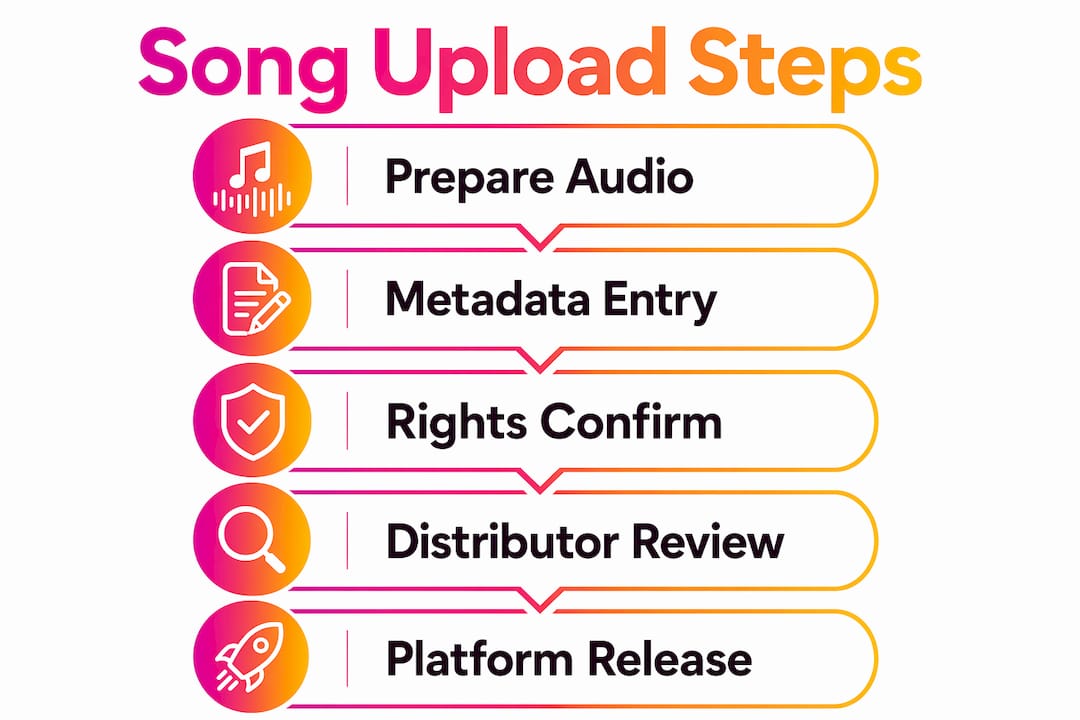
The submission process follows a consistent sequence regardless of which distributor you use:
- Create your release: enter all metadata, upload your WAV master and artwork
- Distributor quality check: automated and manual review of file formats, artwork dimensions, and metadata completeness
- DDEX conversion: your files are packaged into the format each platform accepts
- Platform delivery: files are sent to each streaming service you selected
- Platform processing: each service runs its own internal review before making the release live
- Release goes live: your music appears on the platform on or before your chosen release date
Distributor review takes 1–7 days, and streaming platforms then process releases within 1–3 days after distributor approval. That timeline is why submitting at the last minute is a serious risk. A single flag during the quality check restarts the clock.
Distributor pre-delivery checks act as a protective filter, catching errors before they reach platforms. This reduces the chance of a public rejection, but it also means any mistake you make in preparation adds days to your timeline. The artists who move fastest through this process are the ones who submit complete, accurate files the first time.

Different distributor tiers suit different needs. Entry-level services charge per release or take a percentage of royalties and suit artists releasing occasionally. Mid-tier services offer annual flat fees with unlimited releases and suit artists releasing regularly. Enterprise-level services provide dedicated account management, sync licensing support, and direct label services for high-volume catalogues. Choosing the right tier depends on your release frequency and the level of support you need.
What is the best timing and strategy for submitting your release?
Timing a release is as technical as preparing the audio. Submit your release 3–4 weeks before your chosen release date to allow time for distributor review, platform processing, and editorial pitching. Pitching to Spotify’s editorial team through Spotify for Artists requires at least 7 days’ lead time and one previously live release on the platform. Submitting early gives you the best chance of playlist consideration.
A well-planned release strategy includes several elements working in parallel:
- Pre-save campaigns: allow fans to save your release before it goes live, signalling demand to platform algorithms
- Editorial pitching: submit your unreleased track through Spotify for Artists with a compelling pitch describing mood, genre, and story
- Social content calendar: plan posts for the week before and the week after release, not just release day itself
- Press and blog outreach: contact music blogs and playlist curators at least two weeks before release
- YouTube content: a long-form music video or visualiser published on release day extends your reach beyond streaming platforms
Artists often treat release day as an endpoint rather than a promotional launch. The first week of streaming data influences how algorithms treat your track in the weeks that follow. A strong first week, driven by pre-release promotion, compounds into longer-term visibility. An unpromoted release, by contrast, rarely recovers momentum once the algorithm has deprioritised it.
Understanding music release strategies before you submit gives you a framework for every decision, from release date selection to content scheduling. The artists who plan promotion before they upload consistently outperform those who treat promotion as an afterthought.
Pro Tip: Claim your Spotify for Artists profile before your first release goes live. You cannot pitch to editorial playlists without it, and setting it up takes time you will not have if you wait until release week.
For a broader view of how music storytelling spans platforms in 2026, the relationship between your upload strategy and your content presence across YouTube, social media, and streaming is worth understanding before you hit submit.
The best practices for song promotion in 2026 consistently point to one truth: promotion that starts before release day performs better than promotion that starts after it. Build the audience before the song arrives, and the song lands somewhere, not nowhere.
Key takeaways
The song upload process requires uncompressed audio, accurate metadata, and a distributor submission submitted at least 3–4 weeks before release to maximise reach and royalty collection.
| Point | Details |
|---|---|
| Use WAV, not MP3 | MP3 uploads face a 70–80% rejection rate; submit uncompressed WAV at 16-bit/44.1kHz minimum. |
| Master to -14 LUFS | Spotify normalises to -14 LUFS; over-compressed masters sound flat on playback. |
| Metadata must match everywhere | Inconsistent artist names or credits across platforms and PRO registrations cause lost royalties. |
| Submit 3–4 weeks early | Early submission allows distributor review, platform processing, and editorial pitching time. |
| Release day is a launch, not a finish | Pre-release promotion drives first-week streams, which determine long-term algorithmic visibility. |
What most musicians get wrong about uploading music
The upload process is a business event, not a file transfer. I have seen talented artists lose royalties for months because they misspelled their own name differently across their PRO registration and their distributor account. The music was excellent. The administration was not.
The most avoidable errors are also the most common. Uploading an MP3 because it is smaller. Submitting artwork at the wrong pixel dimensions. Leaving credits blank because they feel optional. None of these feel like serious mistakes in the moment, but each one either delays your release or costs you money.
Organising a release folder before you open your distributor dashboard changes everything. Put your WAV master, your 3,000 x 3,000 pixel artwork, your metadata document, your lyric sheet, and your credits sheet in one folder. Open it. Check it. Then upload. That sequence takes an extra hour and saves you a week of waiting for a rejection.
The artists I respect most treat every release as a coordinated event. They know their ISRC codes. They have their PRO registration confirmed. They have a content plan ready for the week of release. They submit early and use the waiting period to build anticipation. That is not overthinking. That is professionalism.
— Music
How Musicvideomarketplace supports your release
Getting your files through a distributor is only part of the picture. Once your song is live, it needs an audience, and building that audience requires content that travels beyond the streaming platform itself.

Musicvideomarketplace enables independent artists to create a long-form music video in minutes, upload it directly to YouTube, and launch an ad campaign for their song without needing a production team or a marketing budget. For artists who have just completed the upload process and want their release to reach real listeners, Musicvideomarketplace provides a direct path from finished song to active promotion. Visit Musicvideomarketplace to see how the platform works and get your next release in front of the right audience.
FAQ
What file format do I need to upload a song?
WAV is the required format for distributor submission. MP3 files face a 70–80% rejection rate due to audio quality standards.
How long does the song upload and review process take?
Distributor review takes 1–7 days, followed by 1–3 days of platform processing. Submit at least 3–4 weeks before your release date to allow time for editorial pitching.
What is DDEX and why does it matter for uploading music?
DDEX (Digital Data Exchange) is the industry-standard format distributors use to deliver your audio, artwork, and metadata to streaming platforms. Independent artists cannot bypass this process.
Why does metadata accuracy affect my royalties?
Inconsistent metadata across your distributor, PRO registration, and streaming profiles breaks the royalty trail. Platforms and collection societies match payments to correctly registered, consistently named works.
Do I need to register with a PRO before uploading my song?
PRO registration is not required to upload, but it is required to collect performance royalties. Register with PRS for Music (UK), ASCAP, or BMI before your release date so royalties are collected from day one.
Recommended
- How to convert songs to video: 2026 guide | Music Video Marketplace Blog
- Guide to YouTube music uploads for indie artists 2026 | Music Video Marketplace Blog
- Lyric video creation process: your 2026 guide | Music Video Marketplace Blog
- Complete Youtube Music Upload Workflow for Musicians | Music Video Marketplace Blog
Read next
 The importance of storytelling in musicDiscover the importance of storytelling in music and how it transforms songs into memorable narratives. Connect deeper with your audience.
 The Power of Networking in the Music IndustryLoraa White, founder of Music Video Marketplace and Business Woman of the Year, highlights the power of networking, teamwork, and the upcoming Creator Community connecting musicians and creatives.
 The role of analytics in music marketingDiscover the vital role of analytics in music marketing to grow your fanbase, improve campaigns, and understand listener engagement. Click to learn more!
 Song Teaser Length: How Long Should Yours Be?How long should a song teaser be? Get the right length for TikTok, Reels, Shorts and YouTube, plus how to pick the section of the track and plan your rollout.
Turn the idea into a finished music video.
Drop your track into the Workspace and build your visual in minutes.