
 Try the Workspace
Frequency capping on YouTube: the setup that actually works
Discover effective frequency capping on YouTube to optimize ad exposure and enhance your campaign's unique reach. Start testing today!

Frequency capping on YouTube: the setup that actually works
Frequency capping on YouTube limits how many times the same viewer sees your video ad within a set period. The single best move for most campaigns is choosing Target Frequency over a rigid hard cap, since it optimises for unique reach across your audience rather than just blocking repeats. Start testing around 2 to 4 exposures per week and adjust from there based on what the results show.
TL;DR:
- Using Target Frequency allows for more flexible delivery, helping campaigns reach more unique viewers without prematurely exhausting the audience.
- Campaign-level caps can be exceeded if account- or insertion order-level hard caps are set lower, which could prevent the target frequency from being achieved.
- Setting a weekly target frequency of 2 to 3 impressions is recommended for awareness campaigns, while consideration or launch campaigns may test slightly higher frequencies.
- Reusing the same creative across uncoordinated campaigns counts towards caps and can cause a campaign to reach its limit prematurely.
- Monitoring unique reach and frequency distribution curves helps identify over-served segments and adjust frequency settings accordingly.
Table of Contents
- What is frequency capping on YouTube and how does it work?
- Target Frequency versus hard frequency caps: which should you use?
- How do you set frequency capping in Google Ads and Display & Video 360?
- What frequency range should you actually target?
- What mistakes derail a frequency strategy?
- Which metrics show whether your frequency setting is working?
- Practical guidance for musicians and music marketers
- Why frequency discipline matters more for music ads than most categories
- Launch frequency-aware campaigns without the creative bottleneck
- Sources
What is frequency capping on YouTube and how does it work?
Frequency capping restricts the number of times a person can see your ad, but the mechanics get more interesting once you look under the hood. You can cap by impressions (every time the ad loads) or by views (only counted plays that meet YouTube’s engagement threshold), and those two numbers behave very differently for the same campaign.
Caps apply at the campaign level, not the account level. That distinction trips up a lot of advertisers running several video campaigns at once, because Google Ads’ frequency capping settings let impressions or views from other campaigns count toward a single campaign’s cap if the same creative is reused. Run the same 30-second cut across three campaigns targeting overlapping audiences, and you can hit your cap far sooner than the numbers on any one campaign dashboard suggest.
Signed-in counting also matters. Google can track frequency more precisely against a logged-in Google account across devices, while device-level counting (for signed-out viewing) is cruder and can let the same person see your ad more often than intended, simply because they are being counted as two separate “viewers” on their phone and their laptop.
A few practical examples of what does and does not count toward your cap:
- A skipped ad within the first five seconds still typically counts as an impression against your cap.
- A view that completes past 30 seconds (or the full ad, if shorter) counts as both an impression and a view.
- The same creative served through a different ad group in a separate campaign can silently eat into your cap total.
- Bumper ads and skippable in-stream ads are tracked separately by format, even when shown to the same viewer.
Understanding this mechanic is the foundation for everything that follows, because it explains why two campaigns with “identical” settings can deliver frequency very differently.
Target Frequency versus hard frequency caps: which should you use?
Target Frequency and a hard cap solve different problems, and mixing them up is one of the most common configuration mistakes on YouTube.
A hard cap is blunt by design: it tells the system “no user sees this ad more than X times in Y days,” full stop. It is a ceiling, not a goal. Display & Video 360’s Target Frequency line items, by contrast, work as an optimisation goal. The system builds a delivery distribution across your whole audience, allowing some individuals to see the ad slightly more or less than the target so that the group average lands close to your chosen number, while autocapping to protect unique reach.
That difference changes what each tool is good for:
- Hard caps suit campaigns where user experience control is non-negotiable, such as retargeting a small, warm audience you don’t want to annoy.
- Target Frequency suits awareness and consideration campaigns where maximising unique reach at an efficient frequency matters more than policing every individual exposure.
- A hard cap set too low at a higher level (account or insertion order) will override and block a Target Frequency goal from being reached, regardless of what you set at campaign level.
- Target Frequency supports bumpers, skippable and non-skippable formats within the same optimisation, which a flat hard cap does not coordinate automatically.
Pro Tip: Before launching, audit every cap sitting above your campaign, including insertion order and account-level settings in Display & Video 360. A forgotten hard cap two layers up is the single most common reason a Target Frequency goal never gets hit.
If your goal is reach efficiency and brand recall, lean on Target Frequency. If your goal is strict suppression, such as capping exposure during a sensitive promotional window, a hard cap earns its place.
How do you set frequency capping in Google Ads and Display & Video 360?
Setting a cap correctly takes a few minutes once you know where the settings live. Here is the practical path for both platforms.
- In Google Ads, open your Video campaign settings and scroll to Additional settings. Frequency capping sits inside this panel, closed by default.
- Choose whether to cap by impressions or views, then select your interval: per day, per week, or per month. Google Ads’ help documentation confirms these intervals are the only options, so plan your cadence around one of the three rather than a custom window.
- Enter a whole number for the cap value. Decimal or fractional caps aren’t accepted, so round to the nearest sensible figure for your objective.
- Save at the campaign level. Remember this cap applies only to that campaign; sibling campaigns sharing the same creative need their own review.
- In Display & Video 360, create or edit a line item and select Target Frequency as the optimisation goal rather than a fixed cap.
- Set your weekly or monthly target number. The system autocaps behind the scenes to protect unique reach, so you are setting a goal, not a ceiling.
- Check the insertion order and advertiser levels above your line item for any pre-existing hard caps that could conflict with your target.
- If running several campaigns toward one audience, group them using video campaign groups, which let you set a single reach or frequency goal across the group with unified reporting instead of managing each campaign in isolation.
- Re-check settings after any major edit, since large changes can reset how the system is building toward your target.
Coordinating multiple campaigns without campaign groups is where most cross-campaign frequency problems start, because nothing stops two campaigns targeting the same audience from independently trying to hit their own frequency goals.
What frequency range should you actually target?
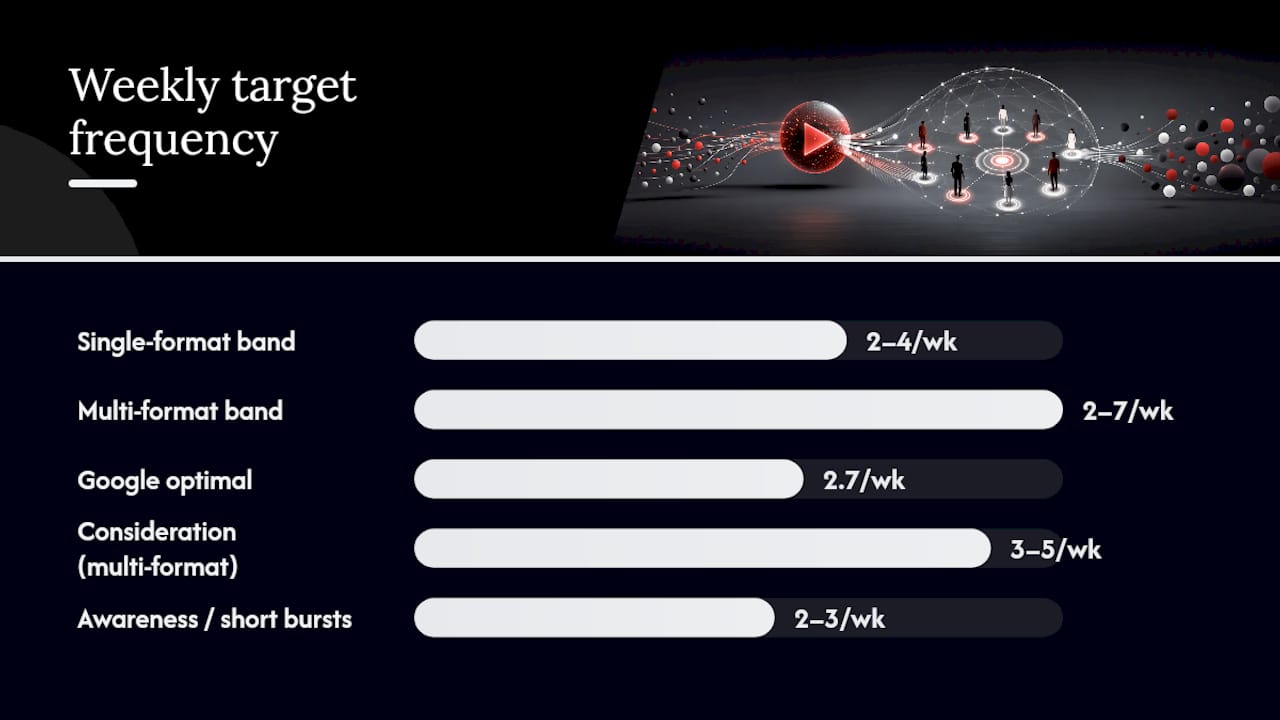
There is real data behind the ranges Google recommends, and it is worth understanding why the numbers sit where they do rather than treating them as arbitrary defaults.
Google’s own guidance sets weekly Target Frequency bands at roughly 2 to 4 exposures for single-format campaigns and 2 to 7 for multi-format campaigns, with monthly equivalents of 4 to 8 and 4 to 12 respectively. The wider range for multi-format campaigns reflects the fact that a viewer seeing a bumper, a skippable ad and a non-skippable ad counts each as a separate exposure, so the ceiling needs more room.
Google’s internal analysis points to an optimal frequency of around 2.7 weekly impressions for measurable ROI gains, and campaigns configured correctly with Target Frequency hit their stated goals more than 95% of the time.
That 2.7 figure sits comfortably inside Google’s recommended single-format band, which is a useful sanity check if you are choosing a starting point cold. It also lines up with broader media mix modelling that Google cites, showing traditional TV ROI declining once weekly frequency climbs past six or seven impressions, the kind of repetition that trains viewers to tune an ad out rather than act on it.
Practical starting points by objective:
- Awareness campaigns, running four weeks or longer: start at the lower end, around 2 to 3 weekly, and let the distribution build gradually.
- Consideration or launch campaigns with multiple creative formats: test 3 to 5 weekly, since format variety absorbs a slightly higher frequency without feeling repetitive.
- Short, conversion-focused bursts (a single-week release push): a tighter cap closer to 2 to 3 weekly usually protects against burning through a small addressable audience too fast.
Run a genuine test where possible: two matched audience segments, identical creative and budget, different frequency settings, then compare recall or conversion lift rather than raw click-through rate. Click-through is a poor proxy for whether frequency is helping or hurting brand perception.
What mistakes derail a frequency strategy?
Most frequency problems on YouTube trace back to one of a handful of avoidable errors, and they compound quickly once several campaigns are running at once.
Treating Target Frequency and hard caps as interchangeable is the first. They are not the same tool, and setting a hard cap “just in case” alongside a Target Frequency goal often blocks the very outcome you were optimising for. If a hard cap sits above your Target Frequency campaign at the insertion order or account level and it is lower than your target, the hard cap wins every time.
Reusing identical creative across multiple uncoordinated campaigns is the second. Impressions and views from other campaigns count toward a campaign’s cap when the same asset is in play, so a well-intentioned “run it everywhere” approach can cap a campaign out before it has properly reached its intended audience.
The third is operational instability. Pausing a campaign, swapping audience segments, or making a large budget edit mid-flight disrupts the system’s ability to build toward a frequency goal, because the delivery algorithm has effectively been asked to start again with new inputs.
A short checklist keeps most of this in check:
- Audit caps at every level (campaign, insertion order, account) before launch, not after.
- Track which creative assets run in which campaigns to spot overlap early.
- Avoid major mid-campaign edits during the first one to two weeks while frequency is building.
- Use video campaign groups when running the same audience across multiple campaigns.
Pro Tip: If a campaign suddenly stalls on reach after weeks of steady growth, check for a recent settings change before assuming the audience is exhausted. Frequency builds get reset far more often by human edits than by genuine audience saturation.
Frequency capping, done thoughtfully, reduces the ad waste that comes from over-serving the same small cohort while the rest of your intended audience goes untouched.
Which metrics show whether your frequency setting is working?
The right metrics tell you whether frequency is helping reach or quietly damaging it, and they are not the ones most dashboards surface by default.
Unique reach is the headline number: how many distinct people saw the ad at all, regardless of how often. Average weekly impressions shows the mean frequency across your audience, but it hides outliers, so pair it with the frequency distribution curve, which breaks down what percentage of viewers saw the ad once, twice, five times, or more. A distribution with a long tail (a small cohort seeing the ad ten or more times while most people saw it once) is the clearest sign of an over-served segment worth capping harder.
View rate and conversion lift round out the picture, showing whether repetition is still earning attention or has tipped into being ignored.
- Check unique reach weekly during the first month of a new campaign, then move to a lighter fortnightly check once frequency stabilises.
- Watch the distribution curve specifically for spikes above your intended target band.
- If using video campaign groups, rely on the group-level report rather than individual campaign reports, since it reflects true audience-level frequency across all grouped campaigns.
- Treat a sudden drop in unique reach growth alongside rising average frequency as a trigger to review your caps immediately.
Set a reporting cadence and stick to it. A campaign that looks healthy on impressions alone can be quietly serving the same 15% of your audience over and over while the rest never see it once.
Practical guidance for musicians and music marketers
Music campaigns behave differently from a typical brand awareness push, mostly because release cycles are short and creative variety is limited by budget and time. For a single release, a weekly Target Frequency of 2 to 3 across a four-week window tends to balance recall against audience fatigue. Album cycles running eight to twelve weeks can sustain a slightly higher band, closer to 3 to 5 weekly, provided you are rotating creative rather than repeating the same cut.

That rotation matters more than the frequency number itself. Pairing your full-length music video with shorter clips and bumper cuts of the same footage lets viewers see fresh framing of the same song without the flat repetition that drives skip rates up. Musicvideomarketplace’s workflow is built around exactly this: producing a long-form YouTube-ready video alongside short social clips from the same source material, so you can vary the creative feeding your frequency strategy without commissioning a second shoot.
For deeper tactical detail on exposure levels and creative rotation, Musicvideomarketplace’s guidance on music video best practices for YouTube ads and its step-by-step guide to launching music ads both build on the same principles covered here, applied specifically to release and tour promotion timelines.
Why frequency discipline matters more for music ads than most categories
Music fans re-listen. Music fans also skip ads faster than almost any other audience segment when a video feels like a rerun, which makes frequency discipline less of a technical nicety and more of a direct lever on whether a release campaign converts streams into fans.
Start smaller than feels comfortable. A weekly target of 2 to 3 for a first campaign gives you a clean baseline to measure against before pushing frequency higher on the next release. The guidance in this piece reflects what Google’s own product data shows works at scale, but the only way to know what works for your audience is to run it, watch the distribution curve, and adjust.
— Music
Launch frequency-aware campaigns without the creative bottleneck
Getting frequency right depends on having enough creative variety to rotate through your target audience without repeating the same thirty seconds for a month straight, and that’s usually where music campaigns stall. Musicvideomarketplace exists to remove that bottleneck: browse, customise, and licence a ready-to-edit, full-length music video, then export it alongside short-form clips and bumper cuts built from the same footage, all YouTube-ready in minutes rather than weeks.

None of that replaces the settings covered above. You still choose Target Frequency or a hard cap, still set your weekly band in Google Ads or Display & Video 360, and still watch your distribution curve. What Musicvideomarketplace changes is whether you have the creative assets on hand to act on what that data tells you, instead of running the same clip until your audience tunes it out. For a broader look at pairing creative variety with paid promotion, Audome’s piece on content promotion strategies for creators is worth a read alongside your next campaign brief.
Head to Musicvideomarketplace to browse ready-to-edit videos for your next release and get your creative variants exported before your campaign goes live.
Recommended
- DJ YouTube monetisation: boost your income in 2026 | Music Video Marketplace Blog
- Optimise your YouTube music distribution workflow | Music Video Marketplace Blog
- Complete Youtube Music Upload Workflow for Musicians | Music Video Marketplace Blog
- How to upload long music videos to YouTube easily | Music Video Marketplace Blog
Read next
 How to launch music ads on YouTube: A step-by-step guideLearn how to launch music ads on YouTube with our step-by-step guide. Reach targeted listeners, optimize your budget, and grow your audience effectively!
 Instream Ad Length: How Long YouTube Ads Can BeHow long can an instream ad be? Skippable, non-skippable and bumper lengths explained, plus how to pick the right length for a song promotion.
 Music Ad Budget: How to Plan Your Release Spend in the UKPlan a music ad budget for your next release: what to include, what £250, £1,000 and £5,000 can achieve, platform costs and when to scale.
 Explicit Content on YouTube: 7–8 Seconds Can Limit Ads for MusiciansSee how musicians can label explicit tracks, prepare clean edits, and choose YouTube ad inventory to protect reach and revenue while preserving the original.
Turn the idea into a finished music video.
Drop your track into the Workspace and build your visual in minutes.