
How to launch music ads on YouTube: A step-by-step guide
Learn how to launch music ads on YouTube with our step-by-step guide. Reach targeted listeners, optimize your budget, and grow your audience effectively!
How to launch music ads on YouTube: A step-by-step guide
TL;DR:
- Paid YouTube ads expand reach effectively for independent artists, targeting specific audiences at low cost.
- Crafting attention-grabbing, authentic video creatives with clear calls to action boosts ad performance.
- Long-term, consistent campaigns build organic growth that enhances audience engagement and reduces costs over time.
Getting your music heard on YouTube without a label behind you feels like shouting into a void. Organic reach has collapsed for independent artists over the past few years, and simply uploading a video no longer guarantees even your existing followers will see it. Paid video ads change that equation dramatically. A well-structured campaign puts your song in front of thousands of targeted listeners who have never heard of you, at a cost far lower than traditional advertising. This guide walks you through every stage of launching music video ads on YouTube, from choosing the right platform and ad format to setting precise audience targets, creating attention-grabbing videos, managing your spend, and optimising for genuine long-term growth.
Table of Contents
- Understanding platforms and ad formats for music promotion
- Setting targets: Audience selection and artist channel nuances
- Planning and creating high-performing music ad creatives
- Launching your campaign: Scheduling, spend and optimisation
- Why long-term ad strategy beats quick wins for musicians
- Get professional music videos and support for your next ad campaign
- Frequently asked questions
Key Takeaways
| Point | Details |
|---|---|
| Start with the right tool | Use YouTube Promote for simple, fast launches or Google Ads for detailed targeting and measurement. |
| Prioritise precision in targeting | Take time to understand artist channels to avoid missing or wasting on untargeted videos. |
| Hook viewers quickly | The first few seconds of your music ad are crucial for keeping audiences watching and engaging. |
| Focus on long-term growth | Music ad campaigns pay off most when run consistently for audience-building rather than instant results. |
| Optimise budget and duration | Pace your spending and scheduling in phases for the best reach and learning over time. |
Understanding platforms and ad formats for music promotion
Before you spend a single penny, you need to understand the tools available to you. You can launch music video ads on YouTube either via YouTube’s simplified Promote tool or via Google Ads video campaigns. These are not interchangeable options; they suit different stages of an artist’s journey.
YouTube Promote is built directly into YouTube Studio. You pick a video, set a budget, choose a rough audience category, and YouTube handles the rest. It takes about five minutes. The downside is that targeting is broad and analytics are limited. You will know views went up, but not much else about who watched or why.
Google Ads video campaigns require more setup but give you granular control. You can specify audiences by age, interests, keywords, parental status, even the specific channels and videos your ads appear alongside. The analytics tell you exactly how viewers behaved after watching.
A standard Google Ads flow for YouTube video advertising is to create a Video campaign, choose a campaign objective such as brand awareness or reach, and then select your eligible ad formats including skippable in-stream, in-feed, and bumper ads.
Here is a quick comparison of the main ad formats relevant to music promotion:
| Ad format | Length | Skippable? | Best use for musicians |
|---|---|---|---|
| Skippable in-stream | 12 sec+ | Yes, after 5 sec | Full song previews, music video teasers |
| In-feed video | Any | N/A (user clicks) | Discovery, playlist building |
| Bumper ad | Max 6 sec | No | Tour dates, release announcements |
Which format suits you depends on your goal. If you want someone to actually hear your track, skippable in-stream is your primary tool. If you want a new listener to choose to engage, in-feed works well because they actively click on your thumbnail. Bumper ads are too short for music itself but perfect for event announcements layered on top of an existing campaign.
- Use Promote for your very first campaign or for quick boosts on a tight timeline
- Use Google Ads once you want to test different audiences and scale what works
- Combine in-stream and in-feed to cover both passive and active listener behaviour
- Add bumper ads during tour or release windows as reinforcement
For guidance on how each format performs in practice, check out YouTube ad best practices to see real examples of what works for independent artists.
Pro Tip: Start with YouTube Promote for your first release just to get comfortable with the mechanics. Then move straight to Google Ads for your second campaign, where you will have much better data and confidence to make real targeting decisions.
Setting targets: Audience selection and artist channel nuances
Once you know the tools, you need to set clear targeting criteria and understand how YouTube channel structures affect your reach.

Audience targeting in Google Ads video campaigns for music is built around several layers. You can target by age and gender (useful if your music skews to a specific demographic), geographic location (essential for tour-focused campaigns), interests and habits (YouTube groups listeners by genre affinity, even for niche categories like lo-fi hip-hop or post-punk), and custom intent audiences built from search keywords. Each layer narrows your potential audience but improves relevance.
A city-specific campaign is one of the most powerful tools available to an independent musician. If you are playing Manchester next month, you run a campaign targeting Manchester postcodes, aged 18 to 34, with an interest in live music. Your ad appears to exactly the people most likely to buy a ticket. This kind of precision was simply not possible five years ago without a substantial marketing budget.
Targeting fans of similar artists is another effective approach. You can serve ads alongside the music videos of artists in your genre, meaning the viewer has already demonstrated taste alignment before your track even plays.
The critical watch-out: Official Artist Channels consolidate multiple uploads by an artist and can change which videos are actually targetable. This means if you are targeting a competitor’s channel to reach their audience, you may not be reaching all the videos you expect to. Always audit your placement targeting carefully.
Common mistakes musicians make with targeting include:
- Assuming that targeting a popular artist’s name will reach all their content automatically
- Forgetting to add non-artist channels that feature the same music (covers, lyric videos, fan uploads)
- Over-targeting so narrowly that your daily reach drops below a meaningful threshold
- Ignoring negative placements, which let you exclude irrelevant content categories
Pro Tip: Before launching, search for your target artist on YouTube and note whether their channel has the “Official Artist Channel” badge (the musical note icon). Non-official channels containing their music will need to be added as separate placement targets. This single check can save significant wasted spend.
For more detailed approaches to reaching the right listeners, explore YouTube ad targeting strategies with case studies from working musicians.
Planning and creating high-performing music ad creatives
With targeting ready, the next challenge is crafting the right video ad creative that will actually capture attention and drive action.
Music ad creatives should be structured to perform in the first seconds and align with the user’s intent: skippable in-stream ads specifically focus on earning the viewer’s continued watch past the five-second skip window. That five-second window is everything. If your ad starts with a logo animation, a long intro, or silence, the viewer is gone before your music even starts.
The rule is simple: your strongest musical moment, the hook, the chorus, the most distinctive sound, goes first. Not second. Not after a title card. First.
Here is a step-by-step structure for a skippable in-stream music ad:
- Seconds 0 to 5: Drop straight into the catchiest part of your track. No intro, no branding. Just music.
- Seconds 5 to 15: Keep the music rolling. Add visuals that convey mood and personality. This is where you earn the continued watch.
- Seconds 15 to 30: Introduce a light narrative or performance footage. Show your face. Human connection builds recall.
- Final 10 to 15 seconds: Add a clear call to action. “Listen on Spotify,” “Tickets available now,” or “Subscribe for new music” with an overlay card.
In-feed ads work differently. Here, the viewer sees your thumbnail and title first and chooses to click. That means your thumbnail needs to be compelling on its own, and your title should spark curiosity rather than just listing the song name. Think “The track that changed how I write music” over “New Single 2026.”
Bumper ads at six seconds cannot carry musical content alone, but they are excellent when a viewer has already seen your in-stream ad. Serving a bumper after initial exposure reinforces memory. You can use these for one-line messages: release dates, tour cities, or a brief atmospheric visual with your name.
When it comes to creative video ad ideas for independent musicians, the strongest performers tend to be visually authentic rather than highly produced. A well-lit performance video often outperforms a heavily edited concept video because authenticity builds faster trust with new listeners.
For building the actual video, a music video creation guide can walk you through the technical requirements and creative decisions before you go anywhere near an ad platform.
Pro Tip: Create two or three variations of your ad creative with different opening moments and run them simultaneously at a low budget. Google Ads will optimise toward the better performer automatically, giving you real audience data rather than guesswork.
Launching your campaign: Scheduling, spend and optimisation
Armed with creative and targeting, now it is time to launch and manage the actual campaign for maximum impact.
Scheduling and geo-targeting strategy for tour or city-specific launches commonly follows a phased approach: run campaigns weeks ahead of the event, scaling spend in phases from seeding, to push, to ticket urgency. This mirrors how major labels have always handled release campaigns, just scaled for independent budgets.
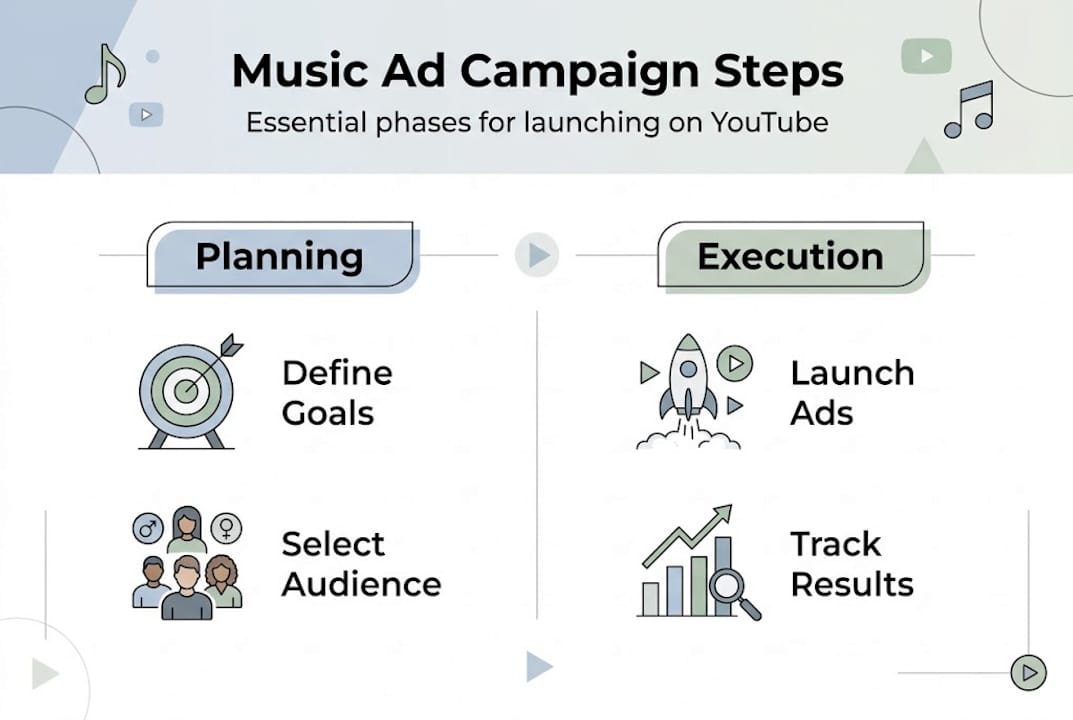
A practical six-to-eight-week timeline looks like this:
- Weeks 1 to 2 (Seeding): Run at a modest daily budget of £5 to £10. The goal is impressions and early data. Let the algorithm learn who is engaging.
- Weeks 3 to 4 (Push): Double or triple the daily budget based on what the data shows. Narrow to the audiences and placements performing best.
- Weeks 5 to 6 (Urgency): If promoting an event, shift messaging to ticket availability and deadlines. Add bumper ads as reinforcement.
- Weeks 7 to 8 (Retargeting): Re-engage viewers who watched more than 30 seconds of your original ad but did not convert. These are warm leads.
On cost: typical cost-per-view ranges for music video ads sit around $0.02 to $0.04 per view, meaning a £100 budget could generate between 2,500 and 5,000 genuine views from targeted audiences. Compare that to the royalty revenue from 5,000 streams (roughly £15 to £20) and it is immediately clear that ads are not a revenue tool. They are an audience-building tool.
| Phase | Daily budget | Primary goal | Key metric |
|---|---|---|---|
| Seeding | £5 to £10 | Data gathering | Impressions, view rate |
| Push | £15 to £30 | Audience growth | Subscribers, saves |
| Urgency | £20 to £40 | Conversion | Click-through rate |
| Retargeting | £10 to £20 | Re-engagement | Repeat views |
For monitoring campaign health, check your view rate (views divided by impressions) weekly. A view rate above 30% for skippable in-stream ads suggests your creative is resonating. Anything below 15% means your opening seconds need reworking.
To build on your campaign momentum, read more about boosting video engagement and video marketing for musicians for strategies that work alongside paid campaigns.
Why long-term ad strategy beats quick wins for musicians
Here is the perspective most musicians miss: a single two-week ad burst is nearly worthless for long-term career growth. Yet it is what the majority of independent artists do. They launch before a release, spend £50 to £100, watch the view counter tick up, then stop. The algorithm forgets them. The audience does not compound.
The real value of music ads is not in the views themselves. Cost-per-view ranges of $0.02 to $0.04 sound efficient until you compare them to streaming royalty returns. The maths will never work as a direct revenue strategy. What does work is treating ads as a sustained signal to YouTube’s recommendation engine. Consistent watch time from targeted viewers tells the algorithm your content is worth surfacing organically. Over three to six months, that compounding effect means organic views start supplementing your paid ones, reducing your effective cost-per-new-fan considerably.
Retargeting is the most underused tactic in independent music marketing. After your main campaign, create a retargeting audience of everyone who watched more than 50% of your ad and serve them your next release or a live session. These viewers already know your sound. Converting a warm audience costs a fraction of cold acquisition. For a deeper look at why this matters, explore growing your music audience through sustained video campaigns.
The artists who win with YouTube ads are not the ones who spend the most in a single week. They are the ones who run consistent, iterative campaigns and let the data teach them.
Get professional music videos and support for your next ad campaign
Turning a great track into a compelling YouTube ad campaign takes two things: strong video creative and a clear promotional strategy. At Music Video Marketplace, we help independent musicians create long-form videos in minutes, ready to upload to YouTube and turn directly into ad campaigns for their songs.

Whether you need to sharpen your creative approach or get a full campaign off the ground, our blog covers everything from music ad best practices to advanced targeting tactics. Browse the marketplace, explore our campaign resources, and take the guesswork out of promoting your next release with tools built specifically for artists who are serious about growing their audience.
Frequently asked questions
How much should I spend on my first YouTube music ad campaign?
Budget enough for a few thousand targeted views, with typical cost-per-view sitting around $0.02 to $0.04, and treat the spend as a learning investment rather than expecting revenue in return.
What is the quickest way to launch a music video ad for my release?
The YouTube Promote tool is the fastest option, allowing you to set up an ad directly from YouTube Studio in a matter of minutes with minimal technical knowledge required.
How do I avoid wasting spend by targeting the wrong videos under an artist’s name?
Check whether the channel you are targeting carries the Official Artist Channel badge, because Official Artist Channels consolidate content from multiple uploads, meaning separate non-official channels hosting the same music will need to be added as distinct placement targets.
How long should I run my music ad campaign for best results?
Commit to at least several weeks, ideally a couple of months, because longer multi-month campaigns allow the Google Ads system to optimise properly and build the kind of audience momentum that generates compounding organic growth alongside your paid spend.
Recommended
- YouTube ad campaigns for indie musicians: a clear guide | Music Video Marketplace Blog
- YouTube ad campaign examples for musicians: proven strategies | Music Video Marketplace Blog
- Music Video Creation Guide for Quick YouTube Launch | Music Video Marketplace Blog
- 6 Key Advantages of YouTube Music Ads for Musicians | Music Video Marketplace Blog
Read next
 Instream Ad Length: How Long YouTube Ads Can BeHow long can an instream ad be? Skippable, non-skippable and bumper lengths explained, plus how to pick the right length for a song promotion.
 Music Ad Budget: How to Plan Your Release Spend in the UKPlan a music ad budget for your next release: what to include, what £250, £1,000 and £5,000 can achieve, platform costs and when to scale.
 Music ad campaign strategies for independent artistsLearn how independent musicians can use targeted ad campaigns on YouTube and beyond to grow their audience, boost streams, and build sustainable momentum.
 Frequency capping on YouTube: the setup that actually worksDiscover effective frequency capping on YouTube to optimize ad exposure and enhance your campaign's unique reach. Start testing today!
Turn the idea into a finished music video.
Drop your track into the Studio and build your visual in minutes.