
 Try the Workspace
YouTube Shorts specs: the complete technical spec sheet
Discover the key YouTube Shorts specs: aspect ratio, resolution, format, and more to optimize your videos for maximum engagement.

YouTube Shorts specs: the complete technical spec sheet
YouTube Shorts run at a 9:16 aspect ratio and 1080×1920 resolution, and any vertical or square video up to three minutes now qualifies as a Short. Export as MP4 with H.264 codec video and AAC‑LC audio, and match whatever frame rate your source footage was shot at rather than converting it.
That’s the whole answer in one breath. Here’s what it means in practice:
- Aspect ratio: 9:16 (vertical) or 1:1 (square) both qualify
- Resolution: 1080×1920 recommended, 720×1280 minimum
- Length: up to three minutes for uploads after 15 October 2024
- Format: MP4 container, H.264 codec, AAC‑LC audio
- Frame rate: match your source, don’t force a conversion
Key Takeaways
Correct classification as a Short depends entirely on shooting or exporting at a vertical or square ratio under three minutes, with export bitrate and safe-zone placement determining whether that Short actually performs.
| Point | Details |
|---|---|
| Core specs | 9:16 ratio, 1080×1920 resolution, up to three minutes, MP4/H.264 codec/AAC‑LC. |
| Bitrate over pixels | Target 8 to 12 Mbps at 30fps or 12 to 16 Mbps at 60fps; bitrate affects quality more than raw resolution. |
| Safe zones matter | Keep captions and credits clear of the top, bottom, and right-hand UI overlay areas. |
| Classification is automatic | Aspect ratio and duration alone determine Short status; there’s no manual toggle. |
| Faster production route | Musicvideomarketplace supplies ready-to-edit masters and Shorts exports built to these specs, plus ad campaign support. |
Table of Contents
- What are the exact YouTube Shorts specs and dimensions?
- How should you export a Shorts master for the best quality?
- How does YouTube decide if a video counts as a Short?
- Why do some Shorts lose reach, and how do you fix it?
- What should you check before you hit publish?
- What makes a YouTube Shorts ad campaign actually perform?
- A short note on specs and creative choices for musicians
- How Musicvideomarketplace gets your Shorts export right the first time
- Why creators overthink specs and underthink safe zones
- Sources
What are the exact YouTube Shorts specs and dimensions?
Most confusion around YouTube Shorts specs comes from people mixing up “recommended” with “required”. YouTube will technically accept a wider range of files than it recommends, and the gap between the two is where most Shorts end up looking soft, cropped, or oddly compressed.
The recommended resolution is 1080×1920 pixels at a 9:16 ratio. YouTube’s minimum accepted resolution is 720×1280, and the platform will happily take 4K masters, though these get downscaled for delivery to most phones. Square (1:1) videos are also classified as Shorts, which matters if you’re repurposing content originally cut for Instagram feed posts.
| Spec | Recommended | Notes |
|---|---|---|
| Aspect ratio | 9:16 (vertical) | 1:1 (square) also qualifies |
| Resolution | 1080×1920 | Minimum 720×1280; 4K accepted but downscaled |
| Duration | Up to three minutes | Applies to uploads after 15 October 2024 |
| Container | MP4 | MOV and WebM also accepted |
| Video codec | H.264 codec | H.265/HEVC works but H.264 codec has wider compatibility |
| Audio codec | AAC‑LC | 48 kHz sample rate standard |
| Frame rate | Match source | 30 or 60 fps most common |
| Thumbnail | 1080×1920 | Same ratio as the video itself |
A quick note on why 1080×1920 wins as the default: it’s the sweet spot between file size and the resolution most viewers’ screens can actually render. Uploading at 4K sometimes helps because YouTube allocates more bitrate to higher-resolution sources during transcoding, but for typical phone-shot footage, 1080p with a solid bitrate beats 4K with a mediocre one every time.
A few practical points worth flagging before you export anything:
- MP4 with H.264 codec and AAC‑LC is the safest combination for upload reliability across devices and editing software
- Your title and description follow the same character limits as regular YouTube uploads, but Shorts titles get truncated fast in the feed, so front-load anything essential
- Custom thumbnails for Shorts should match the 1080×1920 frame exactly, not a 16:9 crop repurposed from a long-form upload
- If you’re editing footage shot at 24 fps on a cinema camera, don’t force it to 30fps in your export settings just because that’s what you usually use
How should you export a Shorts master for the best quality?
Getting the pixels and ratio right is only half the job. The other half is bitrate, and it’s the part creators skip most often because export dialogues bury it three menus deep.
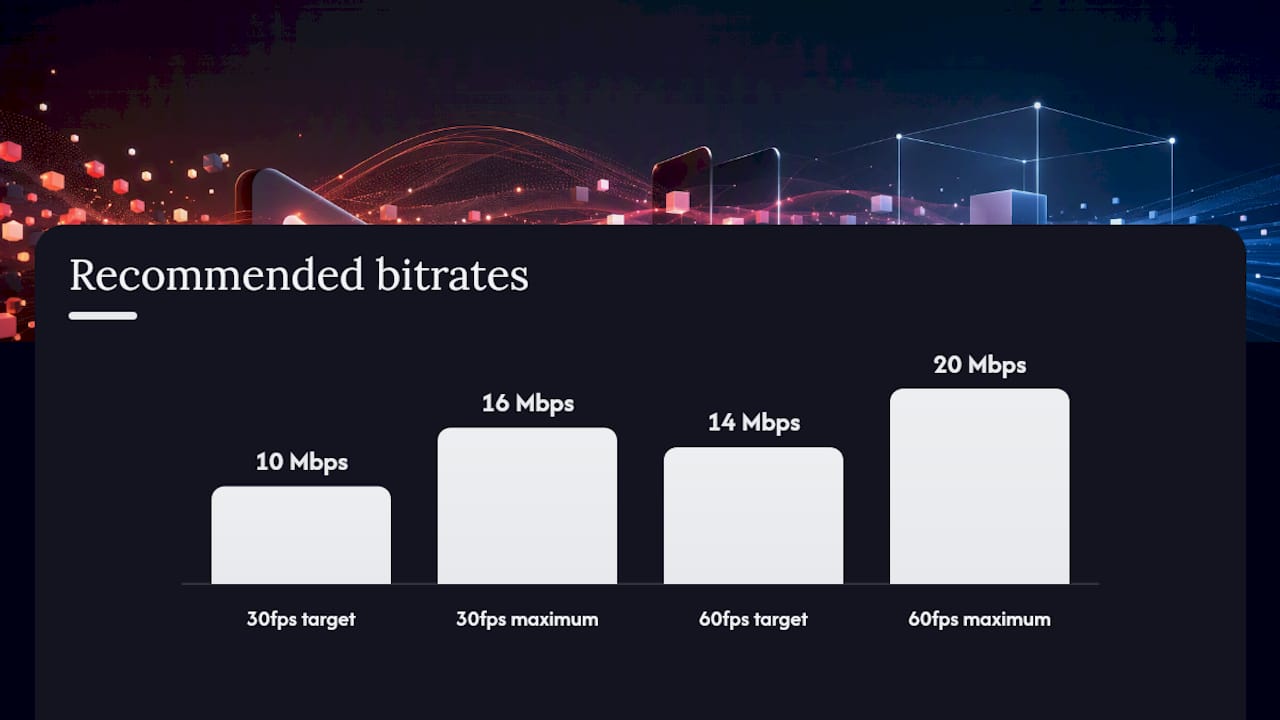
For a 1080×1920 export, aim for 8 to 12 Mbps at 30 fps, or 12 to 16 Mbps if you’re delivering at 60 fps. Higher motion content, like a performance clip with fast camera movement, sits better at the top of that range. A talking-head clip with minimal movement can sit nearer the bottom without losing visible quality.
Here’s a practical sequence for exporting phone-shot music content:
- Confirm your source frame rate first (check the original clip’s properties, don’t guess)
- Set your export resolution to 1080×1920, matching that same frame rate exactly
- Choose MP4 container with H.264 codec High profile
- Set VBR 2-pass encoding with a target bitrate around 10 Mbps and a maximum of 16 Mbps for 30fps content (or 14 Mbps target, 20 Mbps max for 60fps)
- Set audio to AAC‑LC, 192 kbps, 48 kHz
- Enable “fast start” if your editing software offers it, so the file begins playing before it fully downloads
Pro Tip: Upload a master with more headroom than you think you need. YouTube re-encodes everything on its end, and giving it a cleaner, higher-bitrate source file to work from generally produces a sharper final stream than uploading something already compressed to the bone.
If you’re short on upload bandwidth, H.265/HEVC will shrink your file size, but it can cause compatibility issues in some exporters. H.264 codec remains the dependable default unless you have a specific reason to switch.
How does YouTube decide if a video counts as a Short?
There’s no toggle, no checkbox, no manual setting. YouTube’s system reads two things: aspect ratio and duration. Upload a 16:9 file that’s under three minutes and it lands as long-form content, not a Short, regardless of your intent.
A few classification and monetisation points worth knowing before you plan a release:
- Vertical or square videos up to three minutes qualify as Shorts for uploads made after 15 October 2024
- Shorts can be monetised under YouTube’s Shorts-specific revenue rules, separate from standard long-form ad revenue
- Copyright claims on music used in Shorts longer than one minute can block playback or strip monetisation entirely, so if you’re syncing a full track rather than a short clip, check your rights clearance before uploading
- Getting your Shorts feed placement right depends partly on correct classification in the first place, so a wrongly formatted upload can cost you visibility as well as monetisation
Why do some Shorts lose reach, and how do you fix it?
Three mistakes account for most of the reach problems creators run into, and all three are fixable at the export stage rather than requiring a reshoot.
- Letterboxing: uploading a 16:9 clip with black bars top and bottom instead of reframing to 9:16 signals long-form content to the algorithm and looks amateurish in the feed. Crop or reframe in your editor before export, don’t just pad the canvas.
- Ignoring safe zones: YouTube’s Shorts player places UI overlays in predictable spots. The top roughly 140 pixels, bottom roughly 420 pixels, and right-hand 150 pixels can be covered by the subscribe button, likes, comments, and captions depending on device. Keep captions, logos, and song credits inside the central safe area.
- Double compression: exporting from an already-compressed source, then compressing again on upload, creates visible blocking and banding, particularly in fast motion or dark scenes. Avoid re-exporting a file that’s already been through a lossy export once.
Bitrate below roughly 5 Mbps at 1080×1920 is where artefacts typically start showing on close inspection, well under the 8 to 12 Mbps range recommended for 30fps content. Once your ratio is correct, bitrate matters more than pixel count, a clean 720p export will often outperform a poorly encoded 1080p one.
What should you check before you hit publish?
Run this on your phone, not your laptop, since that’s how most viewers will actually watch it.
- Confirm the exported file shows 9:16 or 1:1, with no black bars
- Open the file directly on a phone screen and watch it full length
- Check that captions, logos, and credits sit clear of the top and bottom UI zones
- Preview how the thumbnail and title look in a feed-style layout, not just in your editor
- Confirm audio is synced properly and hasn’t drifted, especially on longer edits
- If anything’s wrong, crop, re-export, or trim, then check again before uploading
A second pass on a different phone model catches issues that a single device sometimes misses, since font rendering and UI overlay position can vary slightly across screens.
What makes a YouTube Shorts ad campaign actually perform?
Shorts ads follow the same technical rules as organic uploads, so if your master already meets YouTube’s advertiser specs, you’re not building a separate asset from scratch.
Vertical framing isn’t optional here. Google’s own guidance recommends vertical video specifically for Shorts ad placements, and a horizontal ad squeezed into a vertical slot performs noticeably worse than one shot or reframed for 9:16 from the start.
A few things that move the needle on Shorts ad performance:
- Front-load the hook. Shorts ads are skippable fast, so your strongest visual or lyric moment needs to land in the first few seconds, not build up to a chorus at the fifteen-second mark.
- Use vertical-native footage where possible. A clip shot horizontally and cropped tends to lose framing and composition that a genuinely vertical shoot preserves.
- Test multiple cut lengths. A short and longer cuts of the same song often perform differently depending on the campaign objective, awareness versus consideration.
- Layer targeting by interest and behaviour, not just demographics. Music ad campaigns tend to perform better when targeting is built around listening habits and related artist affinities rather than age brackets alone.
- Keep captions inside the safe zone on ad creatives just as strictly as on organic Shorts, since the same UI overlays apply.
For musicians building repeat campaigns, treating the ad master and the organic Short as the same file, exported once at the right specs, saves considerable re-editing time down the line.
A short note on specs and creative choices for musicians
Getting the technical numbers right isn’t just box-ticking, it changes how your music actually reads on screen. A high-bitrate master keeps fine visual detail, like lighting on an instrument or a singer’s expression, sharp enough that it supports rather than distracts from the audio.

Song credits and titles need to sit inside that central safe zone, clear of where the subscribe button and comment icons land. If you’re deciding between a full Short around three minutes and a tighter 60-second edit, the tighter cut usually wins for pure discovery and feed performance, while the longer format suits a fuller storytelling edit once you’ve already built an audience willing to watch it through. Licensing considerations for longer cuts, particularly around sync rights for extended clips, are worth checking before committing to the full-length version.
How Musicvideomarketplace gets your Shorts export right the first time
Getting these specs correct manually, shooting, framing for 9:16, hitting the right bitrate, checking safe zones on three different phones, takes real time most musicians don’t have between releases. Musicvideomarketplace exists to skip that entire process: you upload your audio and branding, and the marketplace delivers a ready-to-edit, full-length master built to these exact export standards, along with Shorts-ready clips cut from it.

Every video in the catalogue comes from human video creators, not a generic template, so what you get is a proper cinematic base you can then customise with your own visuals and credits before exporting. Once your master’s ready, the same platform supports launching an ad campaign around it, meaning the Shorts-ready clip and the ad creative can come from a single source file instead of two separate production jobs.
If you’ve got a track that needs a video and a promotional push behind it, browse a ready-to-edit music video master and see how quickly you can get from audio file to a published, Shorts-ready campaign.
Why creators overthink specs and underthink safe zones
Most guides to YouTube Shorts dimensions treat this as a solved problem: hit 1080×1920, keep it under three minutes, done. That’s true as far as it goes, but it misses where reach actually gets lost.
In practice, the biggest performance killer isn’t a wrong resolution, it’s a correctly sized video with the wrong bitrate, or one where the song credit sits directly behind the subscribe button on half the phones watching it. Creators obsess over the numbers that are easy to check (pixels, ratio) and skip the ones that require actually opening the file on a phone (safe zones, audio sync, legibility).
The other underestimated factor is length choice. There’s a reflex to default to the full three-minute allowance because it’s now available, but a 45-second edit built around one strong hook usually earns more completed views than a Short around three minutes that meanders. Length is a creative decision tied to what the clip is trying to do, not a box to max out because the platform raised the ceiling.
Get the pixels right, then spend the time you saved actually watching the export on a phone before you publish it. That single habit fixes more reach problems than any spec chart ever will.
— Music
Sources
- Understand three-minute YouTube Shorts - YouTube Help
- YouTube Shorts aspect ratio and size: The specs that actually matter · Compresto
- YouTube Shorts vertical video guide · vidIQ
Recommended
- Analyse des formats vidéo YouTube en 2026 | Music Video Marketplace Blog
- Angles de visibilité sur YouTube : guide 2026 | Music Video Marketplace Blog
- What is a YouTube channel trailer for musicians? | Music Video Marketplace Blog
- Checklist promotion musicale 2026 : clip YouTube + campagne pub | Music Video Marketplace Blog
Read next
 Get Your Song Into Upload Ready Video in Days for Music ProfessionalsRelease-ready workflow for music professionals: license a full length, ad ready video, drop in your master, and export platform specific short clips in days.
 Apple Music motion artwork: get YouTube-ready video fastUnlock the power of Apple Music motion artwork to create stunning YouTube videos and ads quickly. Get ready-made packages for fast, professional results.
 Use one brand colour as a video accent, not a washElevate your videos by using brand colors effectively. Learn how to create eye-catching visuals that enhance viewer engagement and drive action.
 Best YouTube export settings for creators and editorsMaster YouTube export settings for the best video quality. Use MP4 with H.264 and AAC for stunning uploads that stand out.
Turn the idea into a finished music video.
Drop your track into the Workspace and build your visual in minutes.